
eCommerce
Smart WooCommerce Product Search: Setup, Hosting and Real Costs
 Sergey
Published
19 min read
19 min read
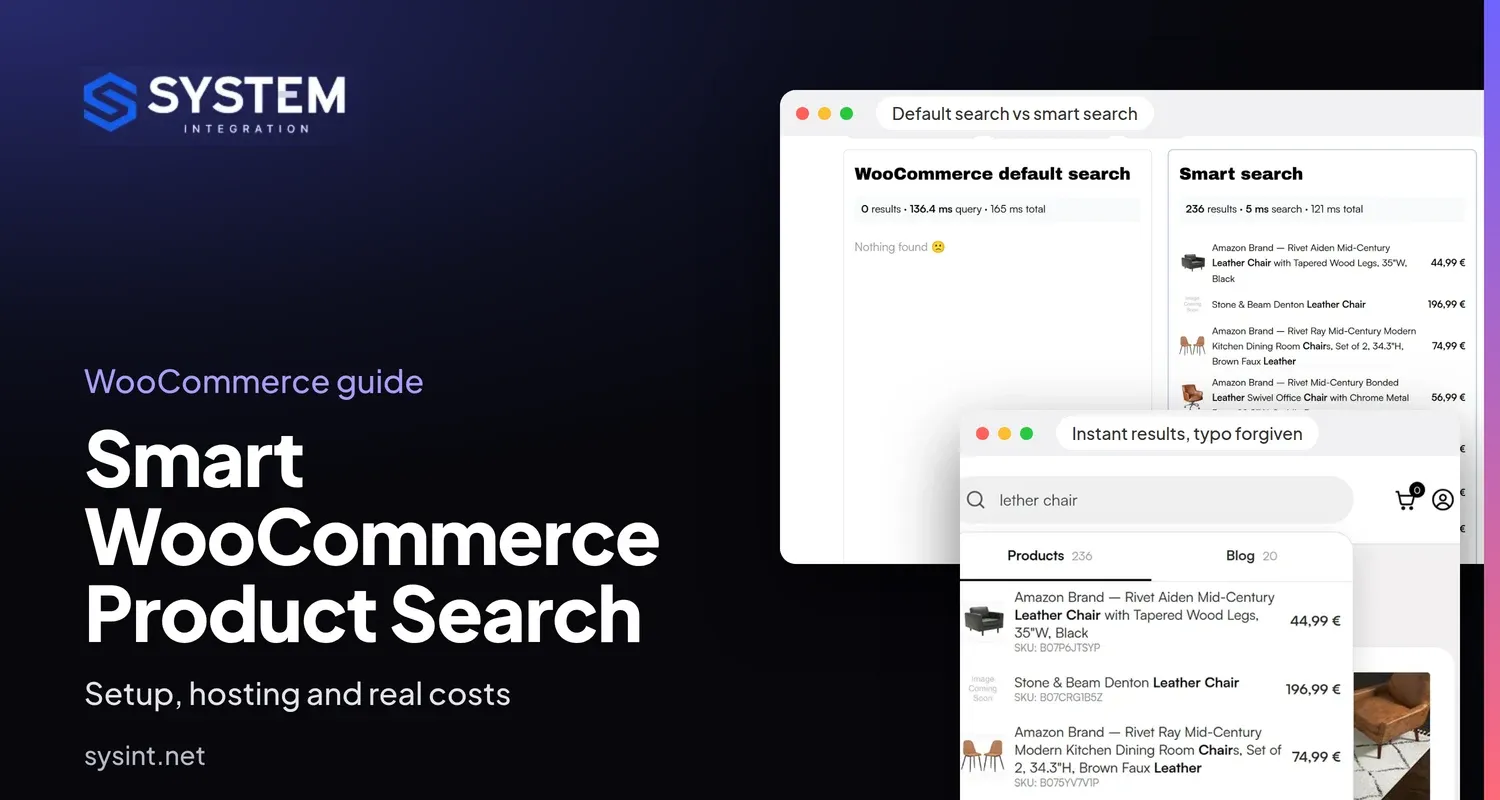
A shopper types "lether chair" into your store. Default WooCommerce search answers "nothing found", even though you stock hundreds of leather chairs. That shopper knew what they wanted, and your store told them you don't sell it.
This guide to WooCommerce product search is for owners and e-commerce managers of larger stores. It covers what shoppers really type, what smart product search does about it, how our setup works, where to host it, and what it costs next to Algolia, Doofinder, Meilisearch Cloud and WordPress plugins. You can try everything described here in our live WooCommerce search demo.
Who needs smart search, and who doesn't
We built this because the same request kept coming from store owners: "we need modern search". Some want shoppers to type full sentences. Others simply see too many empty result pages and feel their WooCommerce search is not working. Before anyone spends money, it is worth checking whether the problem is big enough.
Smart search is usually worth the money when most of these are true:
- Your catalog has more than about 5,000 products.
- You get more than 2,000 to 3,000 visits a day.
- Many visitors use the search box instead of browsing categories and filters.
- Shoppers search by brand, model, SKU or product type.
- You also publish buying guides or care articles that nobody finds.
If you have 500 products and little search traffic, you don't need this. A WordPress search plugin such as FiboSearch or Relevanssi is cheaper and will probably be enough. A separate search engine is worth running when search is one of the main ways into your catalog.
Can search make money?
It can, but only by removing a specific loss. Ecommerce site search is one of the few places where a visitor tells you exactly what they want. If they get the right product, the sale can continue. If they get an empty page, they have one less reason to stay.
We don't promise a conversion lift, because it depends on your catalog, prices and traffic. What we do give you is the data to judge it: which searches are most common and which ones return nothing.
What shoppers actually type
Clients often ask for search that understands natural language. So we checked the search logs of two stores we work with, after removing spam and bot-like queries:
- A furniture retailer with four stores and about 14,000 products: 1.26 million logged searches.
- An audio electronics retailer with about 25,000 products: 159,000 distinct queries from its recent log.
| Words in the query | Furniture retailer (share of searches) | Audio retailer (share of distinct queries) |
|---|---|---|
| 1 | 40.6% | 38.9% |
| 2 | 35.5% | 31.0% |
| 3 | 20.2% | 14.6% |
| 4 | 2.6% | 6.6% |
| 5 or more | 1.0% | 9.0% |
The audio column counts each distinct query once, because that store's log also records partial input from the search box, such as "soun" on the way to "sound". Counting searches there would overstate one-word queries.
At the furniture retailer, 96% of searches had one to three words, 1.9 words on average. At the audio retailer, queries containing words like "for", "with", "under", "cheap" or "best" made up 0.37% of searches, and most of those were plain product types such as "headphone cable" written as "cable for headphones". The longest queries were mostly full model names, not sentences.
The real problems were much simpler:
- Typos in popular searches. "Coffe table" was logged 13,756 times at the furniture retailer.
- Plurals and word forms. "Fabric sofas" was logged 6,778 times with no results recorded, while "fabric sofa" returned products.
- Words the catalog doesn't use. "Loveseats", "lounge chairs", and in the audio store, slang for ear pads.
- Empty results. About 10% of furniture searches and 6% of audio searches ended with zero results, based on the last result count each store recorded.
So the main job of search is not to hold a conversation. It is to find the right product quickly from one to three imperfect words.
What smart WooCommerce product search does
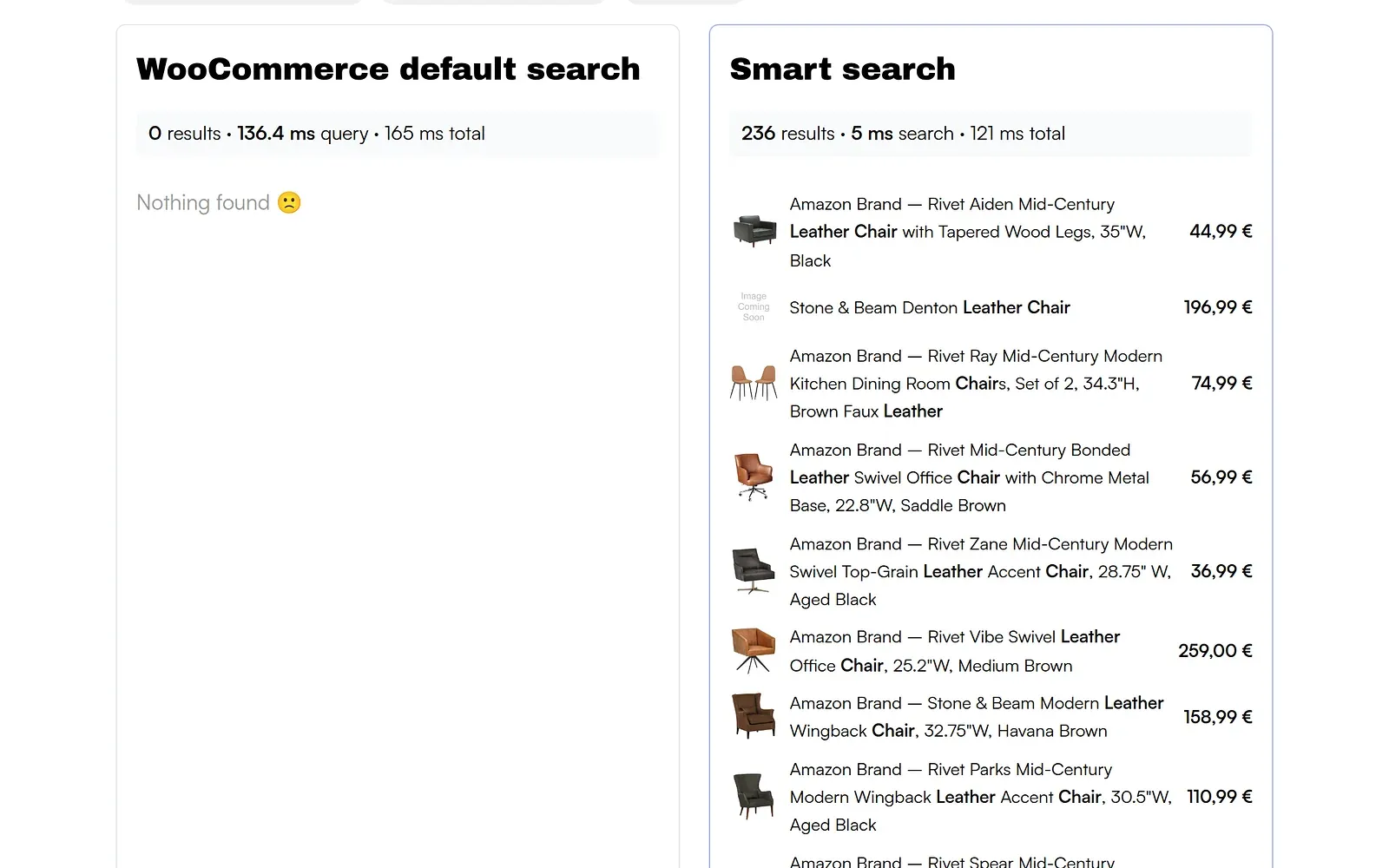
Most modern search engines handle typos out of the box. The difference comes from combining the engine with your store data and tuning the two together. These are the results from our WooCommerce demo, with the same catalog on both sides:
| Query | What it tests | Default WooCommerce search | Smart search |
|---|---|---|---|
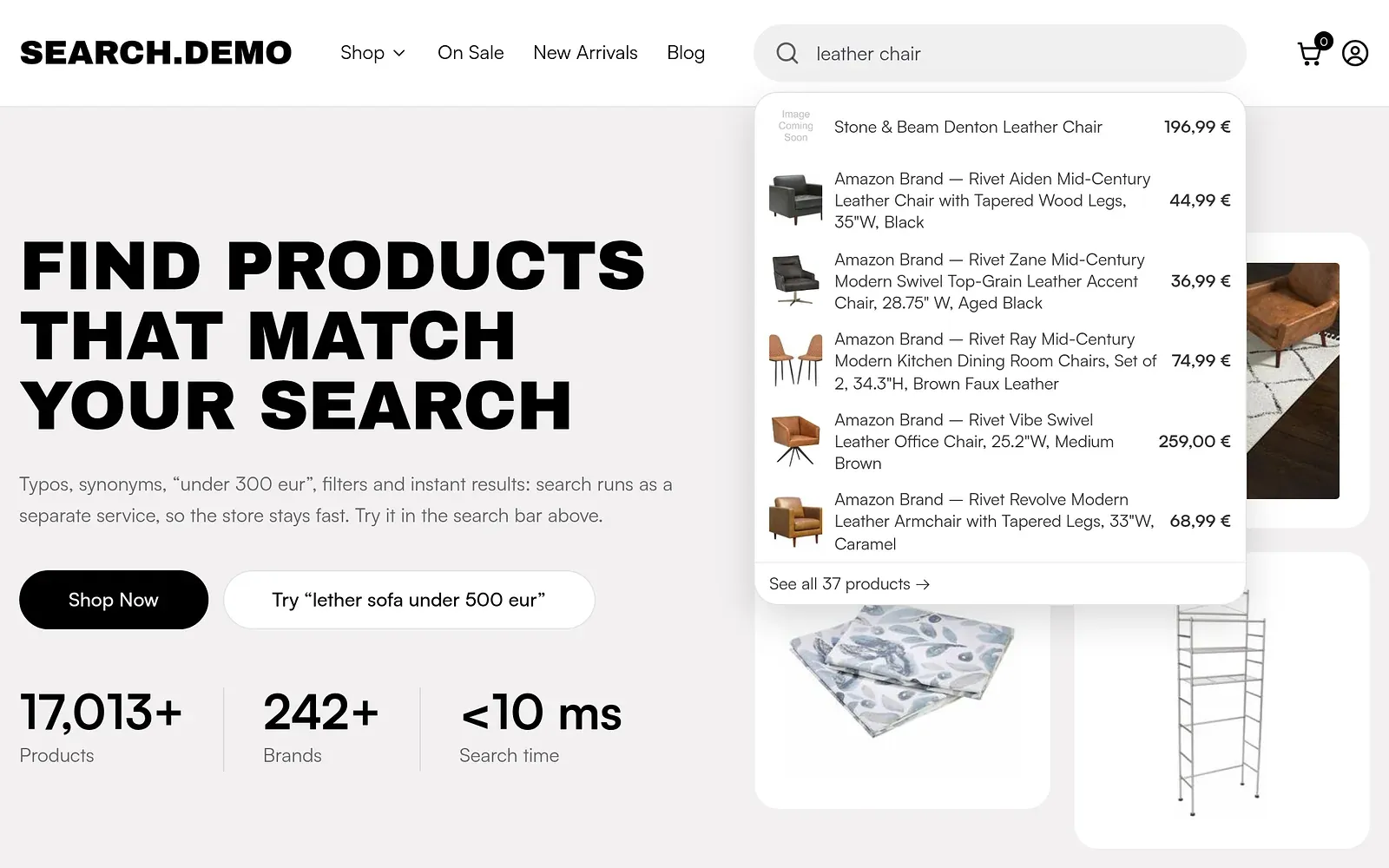
| lether chair | Typo | 0 results | 236 results |
| sofs | Typo in a short word | 0 results | 2,390 results |
| couch | Synonym | 79 results | 642 results |
| rug 100-300 € | Price in the query | 0 results | 92 results |
| leather sofa under 500 eur in stock | Price and stock in the query | 0 results | 259 results |
| mid century table | Several words | 93 results | 293 results |
More results is not automatically better. For "oak", default search returned 206 products and smart search 173, because relevance rules matter as much as recall. Measured from the browser on the live demo, default search took roughly 300 ms and smart search roughly 100 ms, most of which is network time. Inside the search engine, a query takes a few milliseconds.
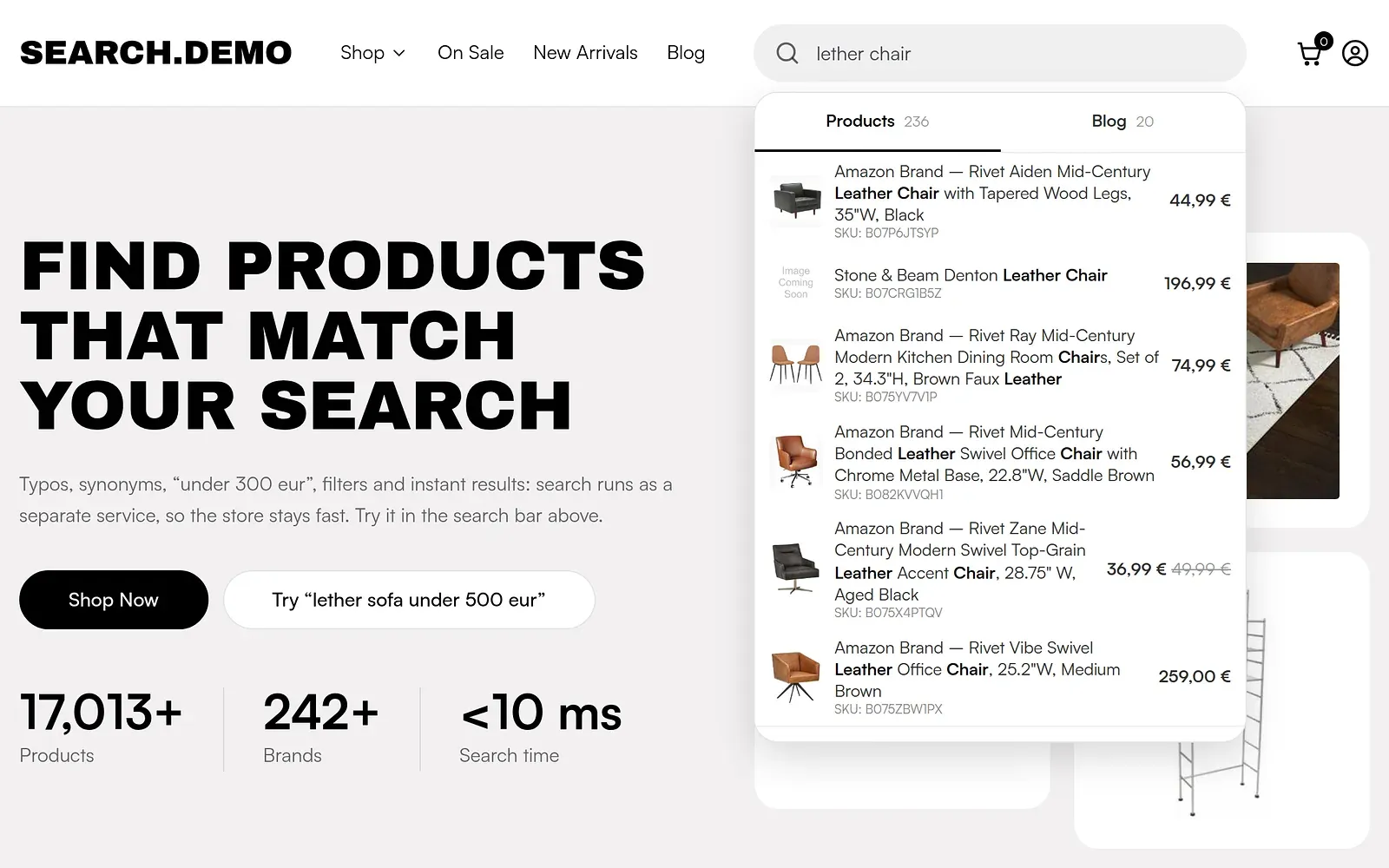
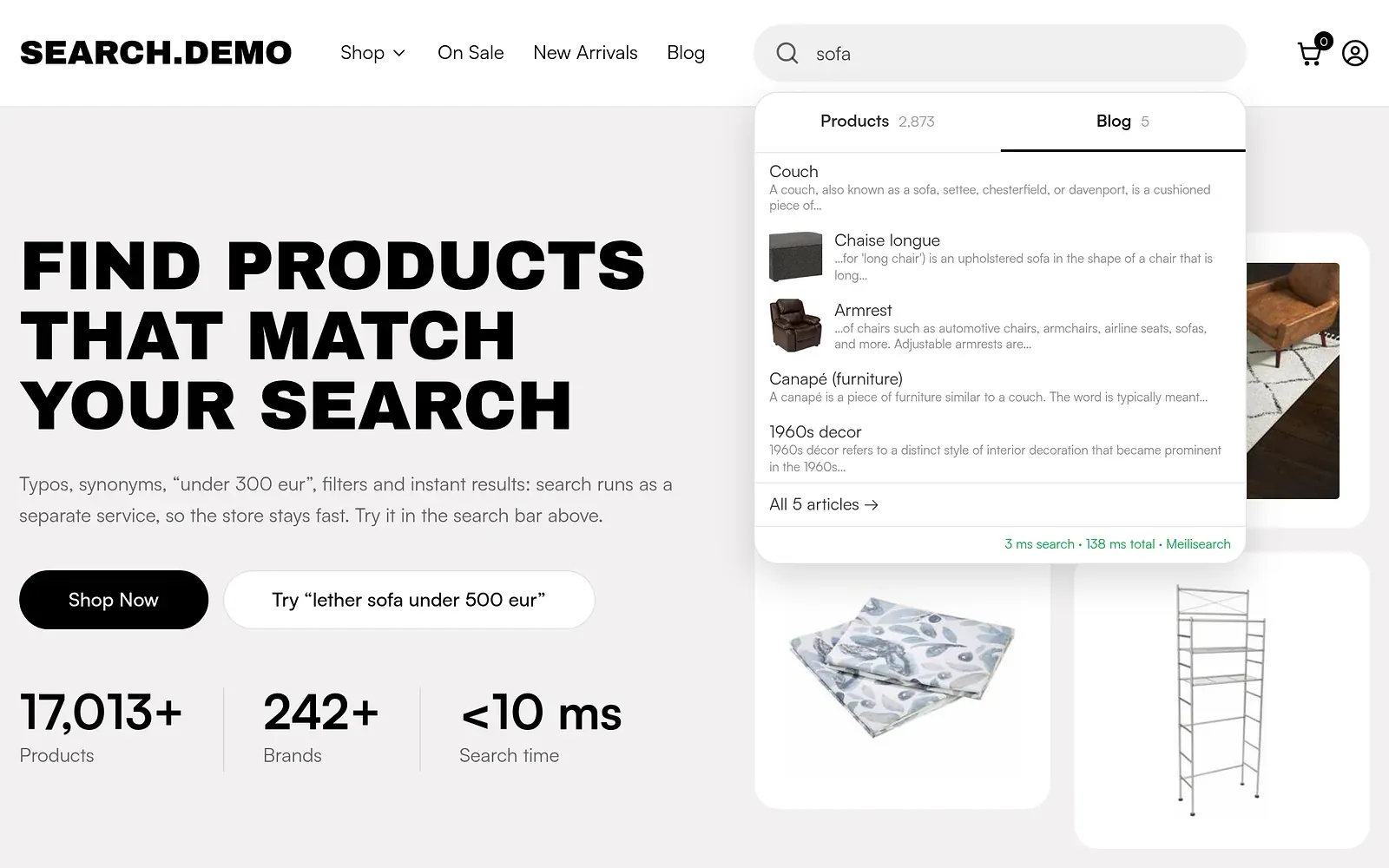
Results while typing
Products, prices and categories appear under the search box as the shopper types. Blog articles get their own tab.
Price and stock inside the query
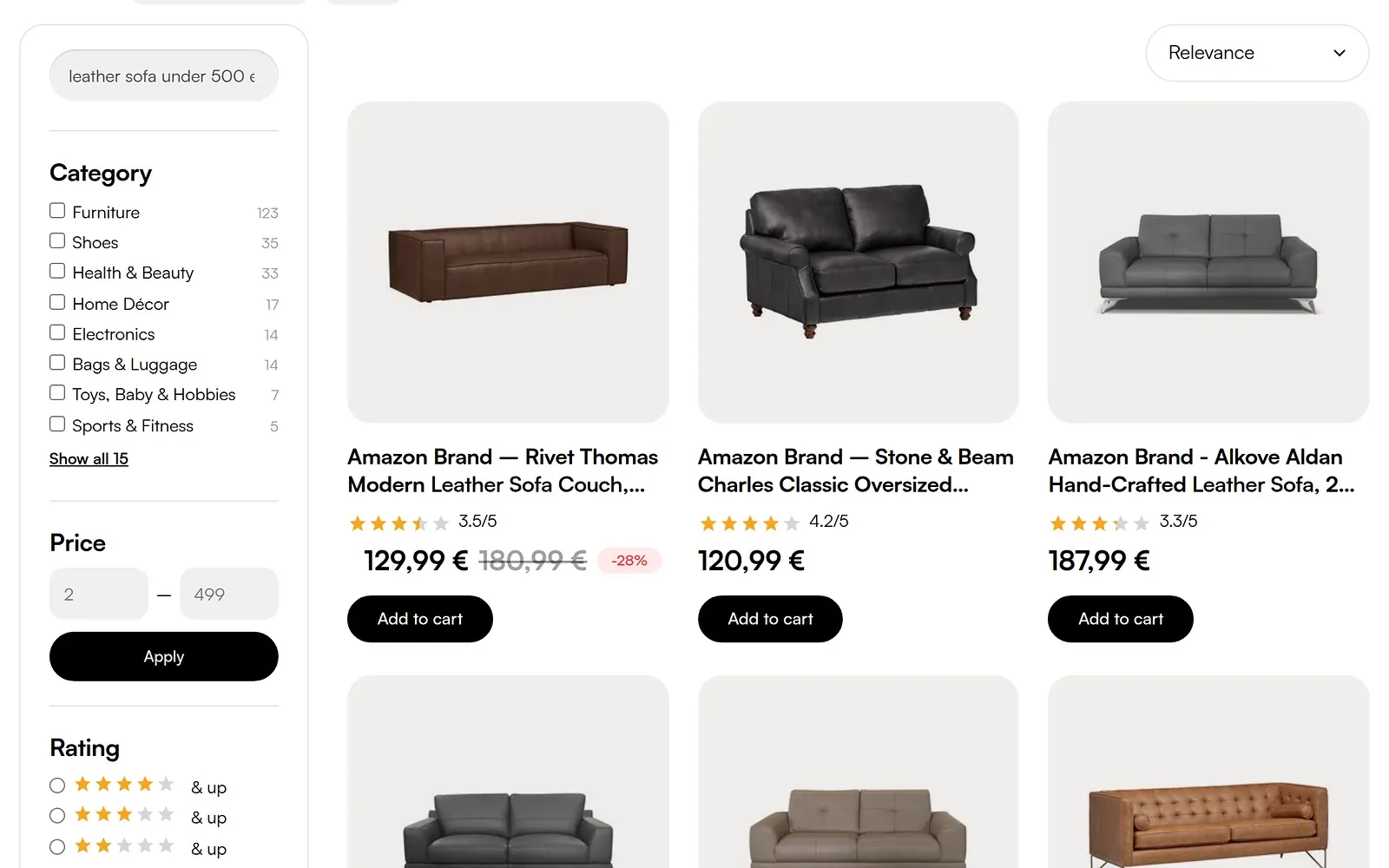
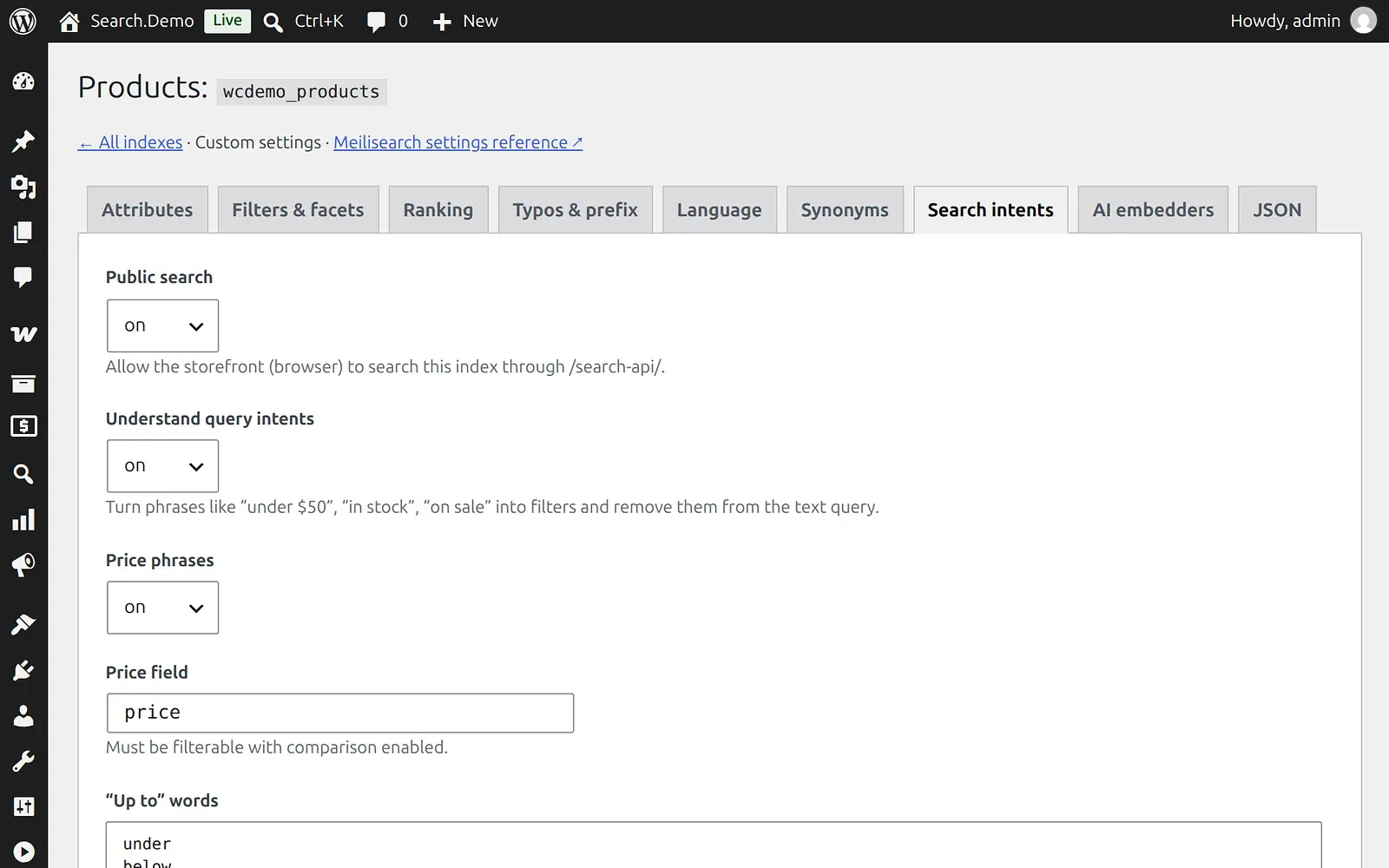
Phrases such as "under 500 eur", "100-300 €", "in stock" and "on sale" become filters. The rest of the query is searched as text, and the page shows how the query was understood. Few shoppers type this way, so treat it as a useful extra, not the main reason to buy.

The order shoppers never notice
Shoppers rarely think about why one product comes first. Relevance always decides first. When products match equally well, ours puts items in stock ahead of sold-out ones, then best sellers ahead of slow movers. If your data includes delivery time or margin, it can become a ranking signal too, with a small change to the plugin.
Filters that match the results
The results page has filters for category, brand, attributes, price, rating, availability and sale items, with counts that update for each query.
Articles next to products
If your blog explains how to choose or care for a product, search can show those articles too. A shopper looking for a sofa may also need a guide to fabrics.
How it works
The solution has three parts, and the plugin does not work alone:
- WooCommerce search plugin. Installed from wp-admin like any other WordPress plugin. It holds the settings, sends product changes for indexing and replaces the search interface in your theme.
- Search service. A small Node.js service between your store and the search engine. It reads price and stock phrases, limits public access and collects search analytics.
- Meilisearch. The search engine that stores the index and returns results.
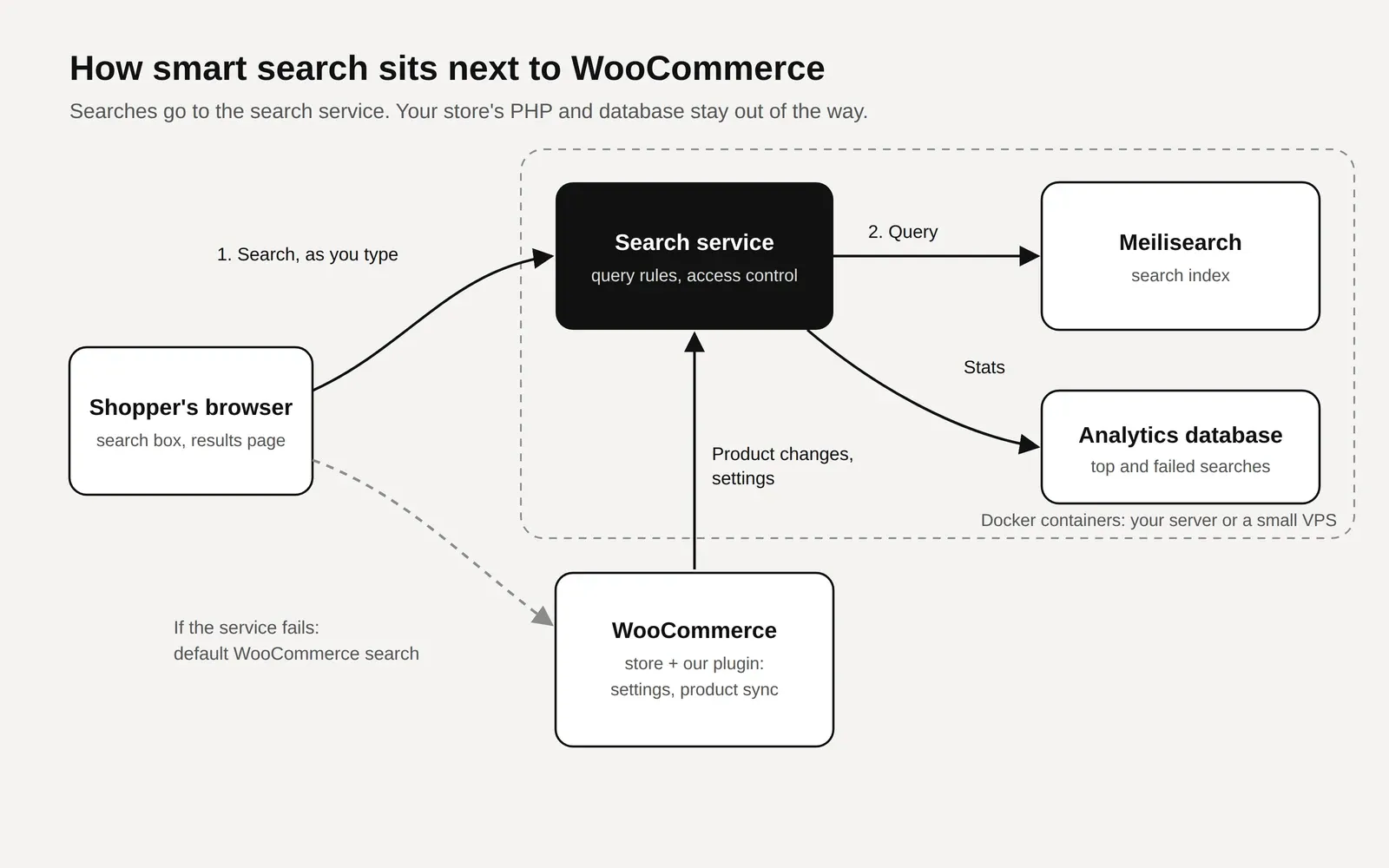
The important detail is the path of a search. The browser talks to the search service directly, so typing a query doesn't start PHP, WordPress or a MySQL query on your store. Your store keeps its resources for catalog pages, cart and checkout.
The full stack
| Component | What it does | Where it runs |
|---|---|---|
| WordPress plugin | Settings, product sync, search box and results page | Your store |
| Action Scheduler and cron | Send product changes in the background | Your store |
| Search service (Node.js) | Public search API, price and stock phrases, rate limits, analytics collection | Docker |
| Meilisearch 1.56 | Search index and results | Docker |
| PostgreSQL 17 | Search analytics only. If it stops, search keeps working | Docker |
| Traefik | HTTPS certificate and routing, used when search has its own VPS | Docker |
On your own server, the store's web server passes /search-api to the search service, so everything stays on one domain. On a separate VPS, search gets its own subdomain and Traefik is the only component open to the internet.
Why Meilisearch
Meilisearch is an open source search engine built for instant, user-facing search. We chose it for four reasons:
- Typo tolerance, prefix search, synonyms, filters and sorting work without building them yourself.
- It answers in milliseconds on catalogs of this size.
- You can run it on your own server, with no fee per search.
- It is simpler to run for product search than a general-purpose engine.
It is also less of a black box than hosted services such as Algolia. A store manager can work with it from a dashboard, and a developer can see and change everything underneath. The self-hosted engine is the same one that runs in Meilisearch Cloud, so you can move between the two later.
Elasticsearch is still a strong tool, and we have tuned it for a B2B store with weights, synonyms, typo handling and suggestions. It is simply more than most WooCommerce stores need to operate for this one job.
Why Docker
Each part runs in its own container, which gives you four practical benefits:
- Isolation. Search software doesn't mix with the PHP, database and packages of your store.
- Security. On your own server, only the public search route is exposed. The engine and admin API stay on an internal network.
- Repeatable setup. The same versions run on the test and live servers.
- Simple rollback. An update can be reverted by starting the previous image.
How the index stays up to date
Data reaches the index in three ways:
- On change. Saving a product, changing stock, trashing, deleting or unpublishing it triggers an update.
- In the background. Updates run through Action Scheduler, the job queue that ships with WooCommerce, so the person editing the product doesn't wait. On your own server, a small cron container runs the queue every few seconds. Regular hosting works differently, as explained below.
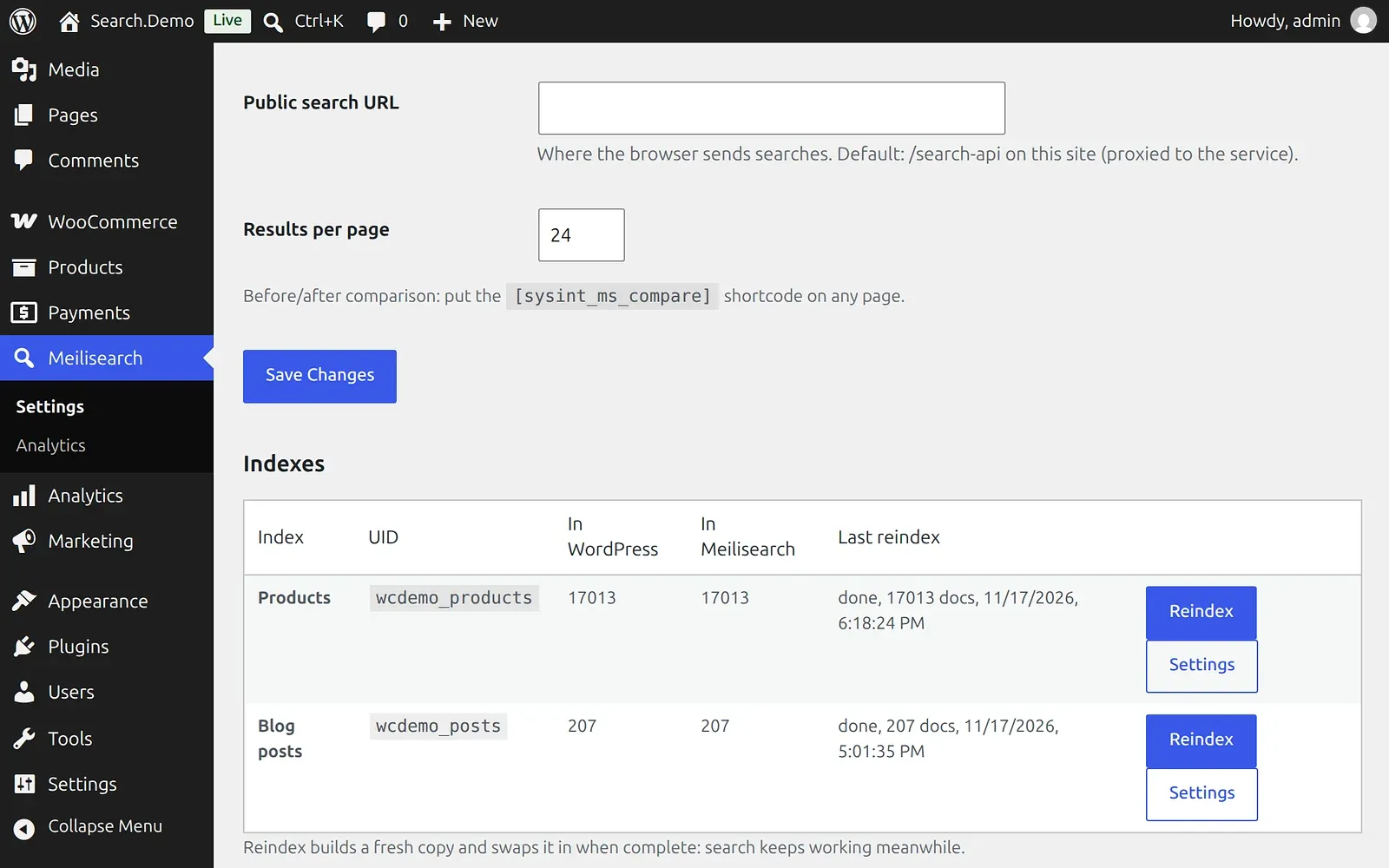
- Manually. A Reindex button in wp-admin, or a WP-CLI command, rebuilds everything.
A full reindex builds a fresh copy and swaps it in when complete, so search keeps working. On our demo, 17,013 products take about 50 seconds.
The settings, and how to use them
Everything is managed in wp-admin. You don't need to edit configuration files to change how search behaves.
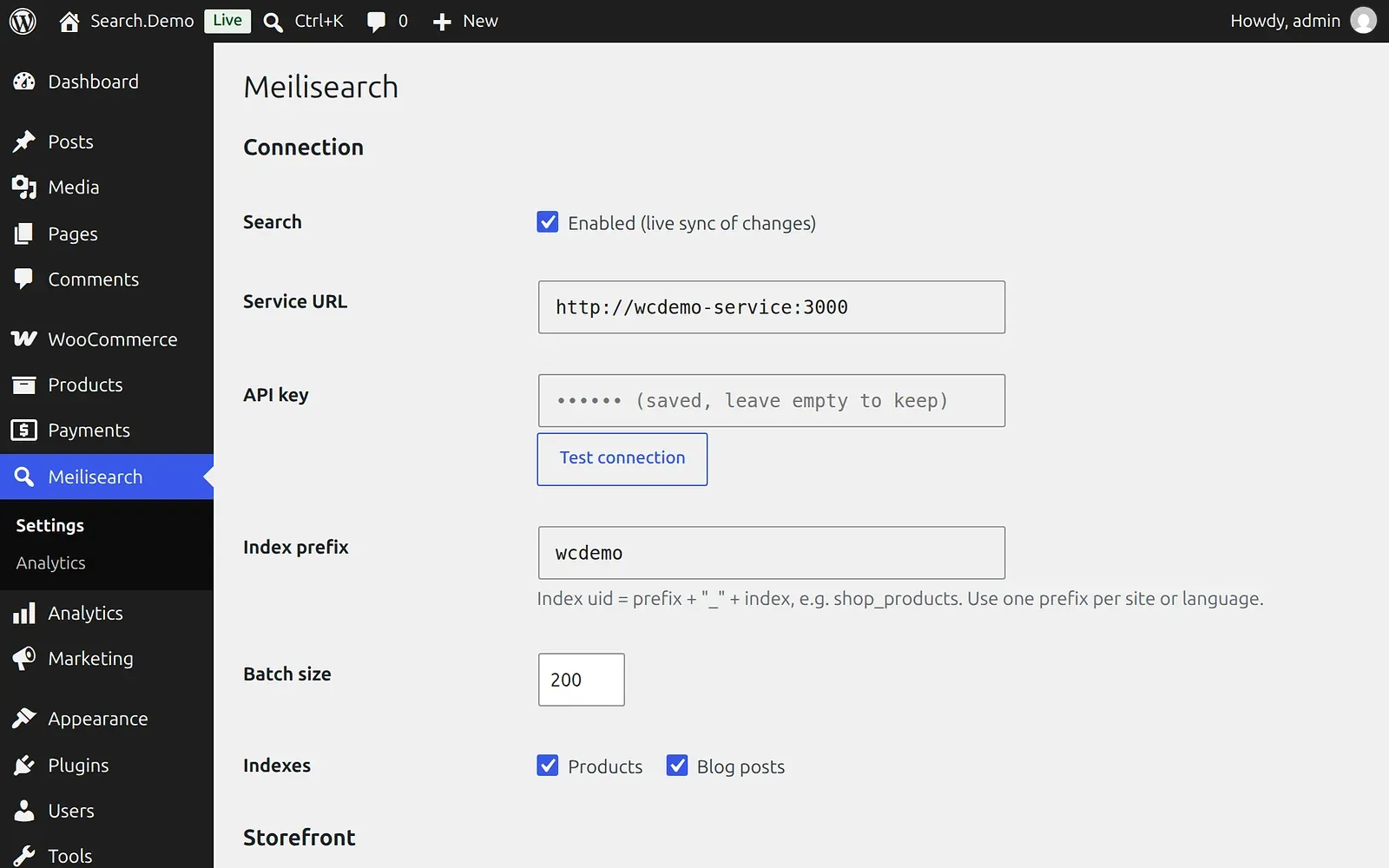
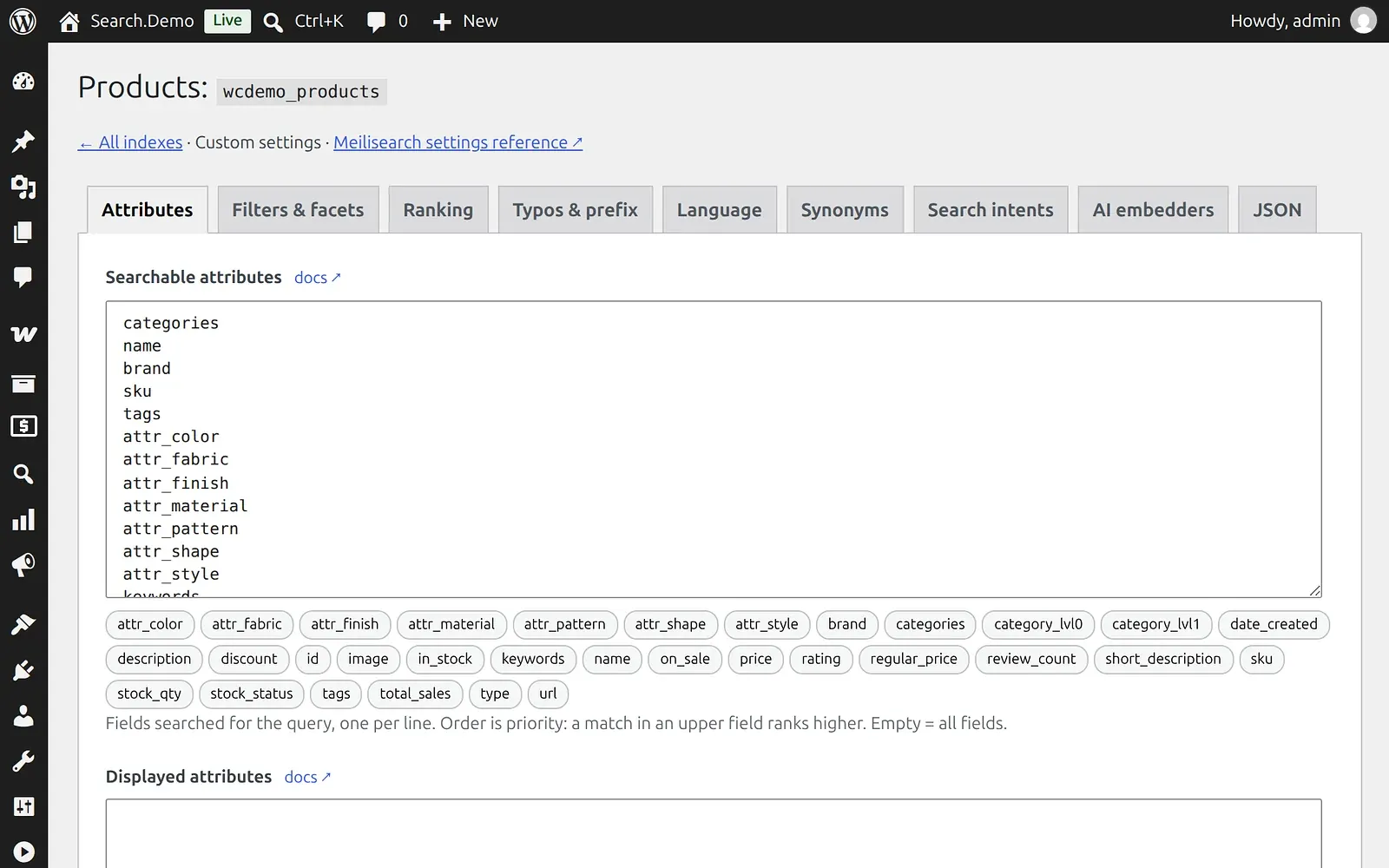
Attributes. Choose which fields are searched. The order is the priority, so a match in the first field ranks higher. Put category, name, brand and SKU above long descriptions. Otherwise a product that mentions "sofa" once in its description can compete with real sofas.
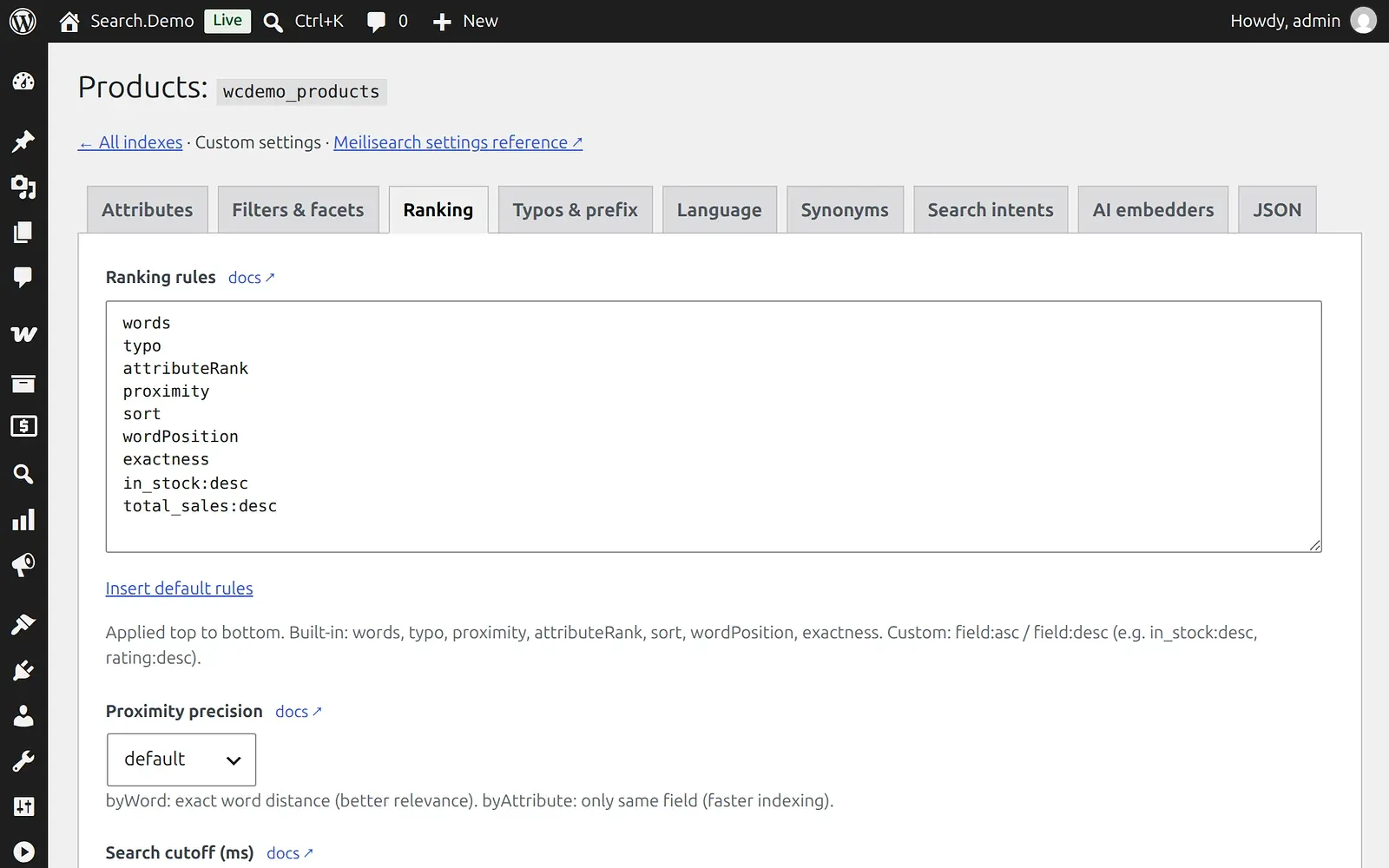
Ranking. Rules apply from top to bottom. Keep the relevance rules first and add business rules after them, such as in_stock:desc and total_sales:desc. Placing a business rule at the top would let a best seller outrank the product the shopper really asked for.
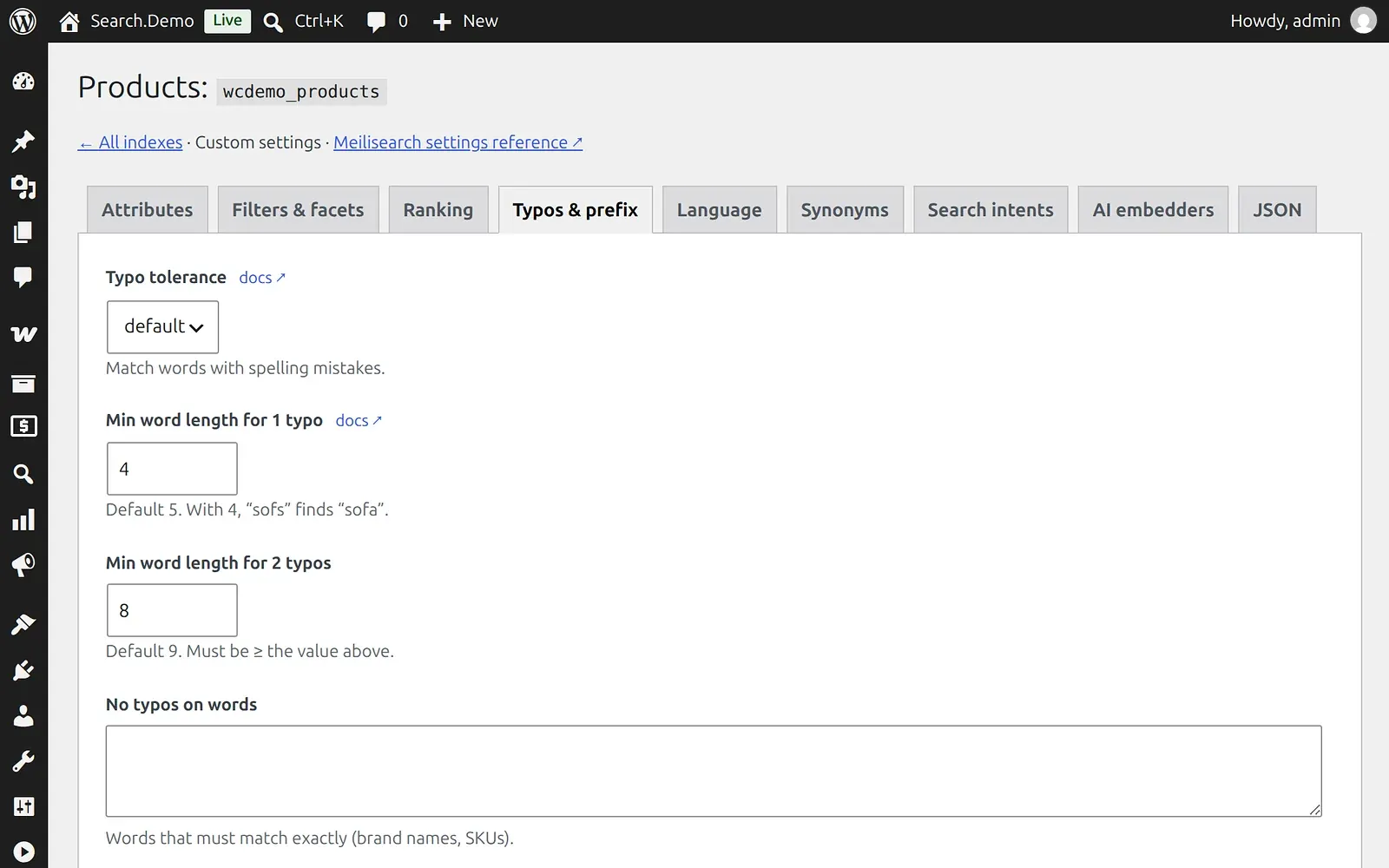
Typos. Set the word length at which one or two typos are allowed. We allow one typo from four letters, so "sofs" still works. For brand names or SKUs that must match exactly, turn typo tolerance off for those words or fields.
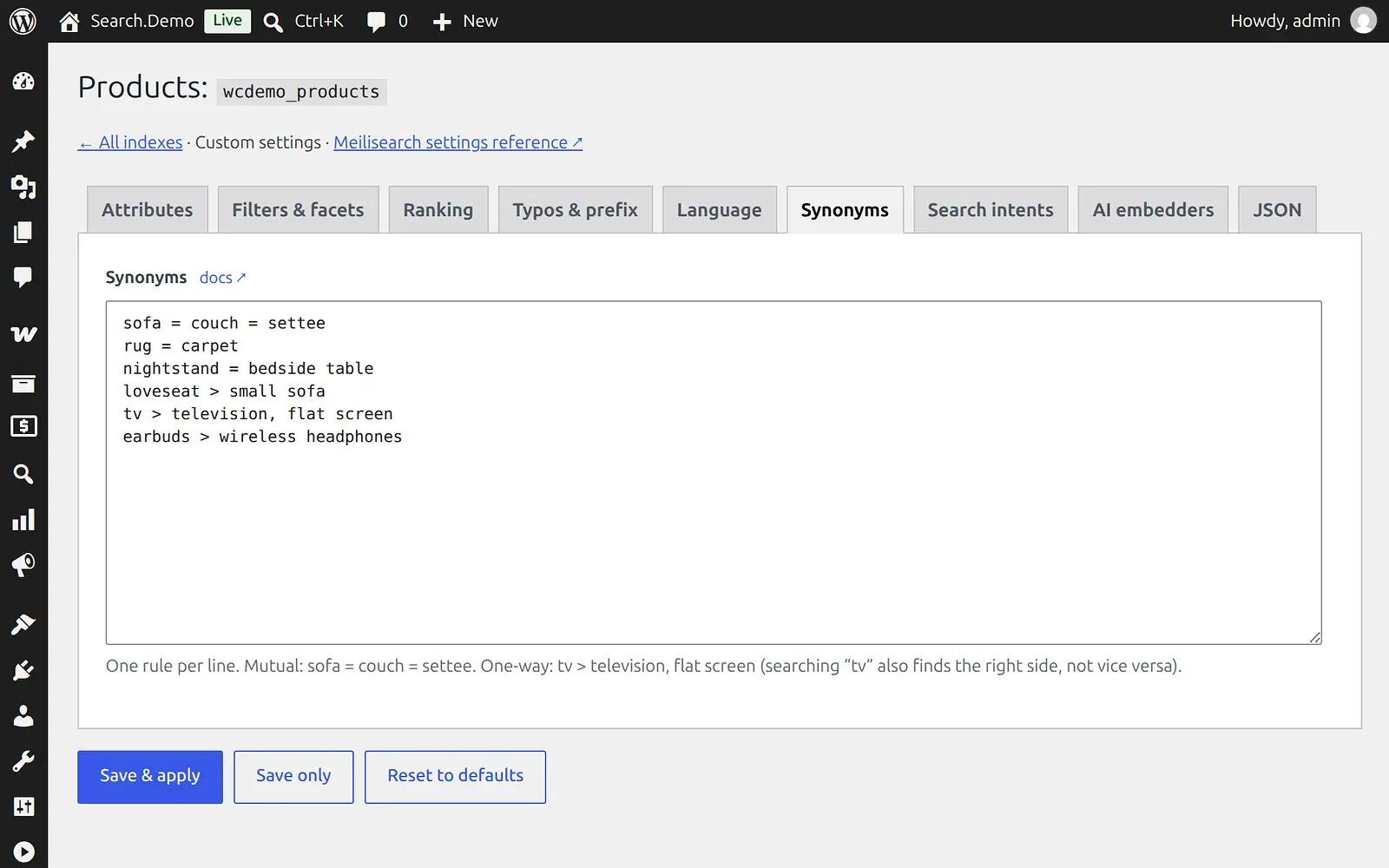
Synonyms. Use two-way rules such as sofa = couch and one-way rules such as tv > television. Start from your analytics, not from guesswork: searches with no results show which words your customers use and your catalog doesn't.
Filters and facets. Choose which fields can filter results and whether they support number comparisons, which price and rating need. Keep this list to what shoppers really use.
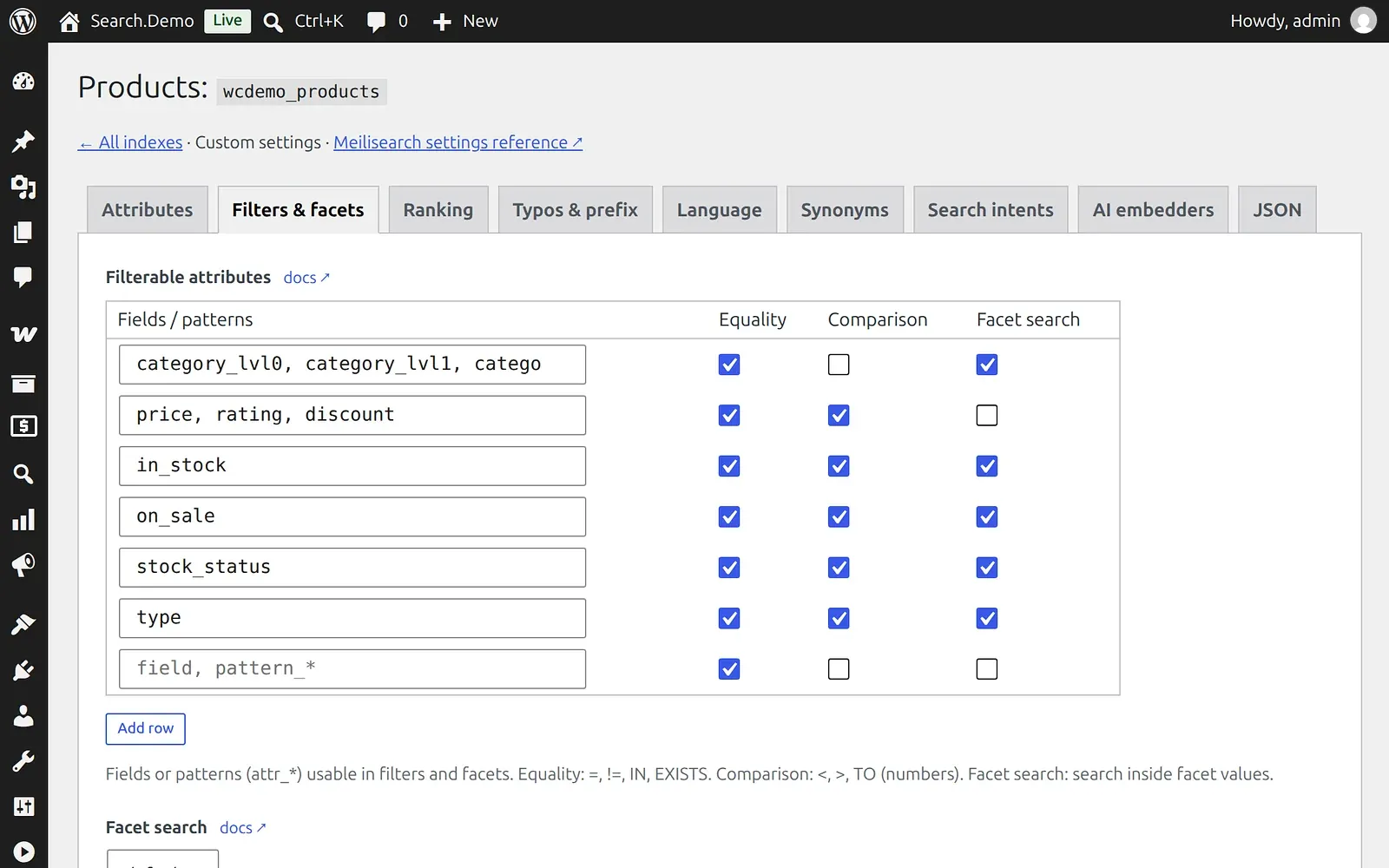
Search intents. Control which phrases become filters, including your own words for "under" or "up to". This matters if your customers search in another language.
Language. Set the language of your fields, stop words and special characters. A term like "wi-fi" or "C#" may need its own rule.
AI embedders. Semantic search is available as an option, but it is off in our demo. Meilisearch stores the vectors itself, so you don't need a separate vector database, and you can bring the embedding model you prefer. It still adds cost, and adding or changing an embedder processes every product again. Given how short real queries are, we would fix typos, synonyms and ranking first, then test it on a small index.
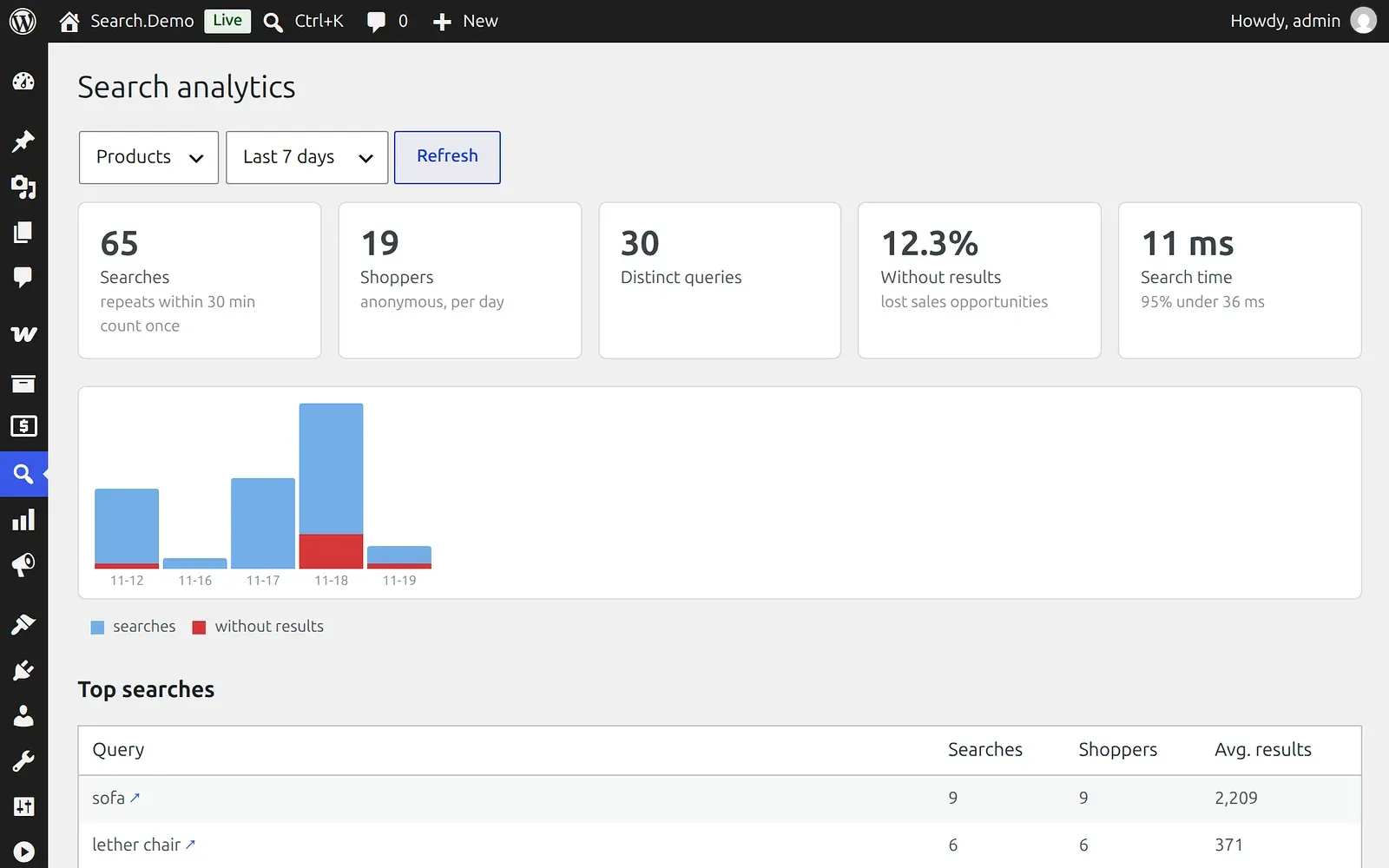
Analytics. See searches, shoppers, zero-result queries and search time. The list of failed searches has an "Add synonym" link, and this is the page worth opening every week. Data is stored without IP addresses and deleted after 90 days. Our demo is new, so the screenshot shows only a few days of traffic.
Where to run it
Your own server or VPS
This is the best fit. If you already have a server, we add the containers next to your store, install what is missing and connect the plugin. You get every feature, and search traffic doesn't add to your bill.
Our demo gives a sense of scale. With 17,013 products and 207 articles, the whole stack, including WordPress and its database, uses about 350 MB of memory at idle. The search indexes take about 305 MB of disk. Plan for at least 2 GB of RAM, preferably 4 GB, so search has room during reindexing.
Regular shared hosting
If you can't install anything on your hosting, the store stays where it is and search runs elsewhere. With a VPS, search gets its own subdomain, such as search.yourstore.com, so we need access to your DNS settings. There are two sensible routes:
| Small VPS | Meilisearch Cloud | |
|---|---|---|
| Monthly cost | $12 to $24 at DigitalOcean | From about $20 for the smallest instance, by region |
| Plugin | Full plugin and search service | Cloud plugin, connects directly |
| What you need | A subdomain and DNS access | A Meilisearch Cloud account |
| Price and stock phrases | Yes | Yes |
| Automatic fallback | Yes | Yes |
| Analytics | Built into wp-admin | In the Meilisearch Cloud dashboard |
| Your data | Stays on your server | Hosted by Meilisearch |
| Server upkeep | Yours or ours | Handled by Meilisearch |
| Best for | Lowest fixed cost, full control | No server to look after |
A DigitalOcean droplet with 2 vCPUs and 4 GB of RAM costs $24 a month. Meilisearch Cloud charges a flat monthly rate for a server sized for your project, with no limit on searches or documents within that server. In US East, the instances cost $14.88 a month for 0.5 vCPU and 1 GB, $29.28 for 1 vCPU and 2 GB and $58.08 for 2 vCPUs and 4 GB, plus disk from $5.28 a month. That puts the smallest instance at about $20, with prices varying slightly by region. Outbound bandwidth is $0.15 per GB, and there is a 14-day free trial.
The Cloud dashboard covers the essentials: searches, users, most searched queries and queries without results. The self-hosted engine is the same, but without that dashboard, which is why our self-hosted setup keeps its own analytics in wp-admin. For very large catalogs or high availability, Meilisearch offers sharding and replication on its enterprise plans.
Both a VPS and Cloud are priced by server, not by searches. If a campaign triples your search traffic, the bill stays the same. What you need to watch is capacity, so the server can handle the peak.
How the VPS route works
- A DNS record points
search.yourstore.comto the VPS, and Traefik obtains the HTTPS certificate. - The browser sends searches straight to that subdomain. The service accepts them only from the store addresses you list.
- The plugin on your hosting sends products and settings to the service's admin API over HTTPS, using a private key.
- Your store itself doesn't change, apart from the plugin and its settings.
What can go wrong on regular hosting
Moving search off the store solves the hosting limit, but it adds moving parts. These are the issues to plan for:
| Risk | What happens | How to handle it |
|---|---|---|
| WP-Cron runs only when someone visits the site | On a quiet store, product changes wait, so search can briefly show an old price or stock status. The product page and cart still show current WooCommerce data | Set up a real cron job every minute, through WP-CLI or the hosting scheduler |
| The hosting has no fixed outgoing IP | If the admin API allows only one IP and that IP changes, product updates stop while search keeps serving old data | Use the IP list when the host guarantees the address. Otherwise rely on HTTPS, a 64-character key and the limit on failed attempts |
| A store address is missing from the allowed list | The browser blocks the search, and the store quietly falls back to default search. Nothing looks broken | List both yourstore.com and www.yourstore.com, then confirm the results page URL doesn't contain msx_native=1 |
| The VPS is far from your customers | Suggestions over 1.5 seconds or results over 2.5 seconds trigger the fallback | Choose a region near your customers and test from there |
| Hosting limits on PHP time or memory | A full reindex can time out | Lower the batch size. Indexing takes longer, but search keeps working |
| The store sends a Content-Security-Policy header | The browser refuses to contact the search subdomain | Add the subdomain to connect-src |
| One more server to look after | The VPS needs system and Docker updates. If it goes down, the store falls back to default search | Keep it updated. The index can always be rebuilt from the store with Reindex |
Meilisearch Cloud removes the server work, but not everything on this list. Product sync still depends on cron, and distance still affects speed. The Cloud plugin also has no per-visitor rate limit of its own, so heavy automated traffic uses up the capacity of your instance. If your hosting can't run reliable background jobs, fix that first, whichever route you choose.
How it compares with Algolia, Doofinder and plugins
The main question is what you pay for: searches, products, a license or a server. Prices below come from the vendors' public pages in November 2026. Check them again before you decide.
| Option | How you pay | Published price | Good to know |
|---|---|---|---|
| Our setup on your server or VPS | Once, plus server | $475 if your team installs it, $2,000 turnkey; VPS about $12 to $24 a month | No fee per search, full control |
| Meilisearch Cloud + our Cloud plugin | Plugin once, plus a flat monthly instance | $145 once, from about $20 a month | No server to manage, no limit on searches |
| Algolia | Search requests and records | Free tier and Grow plans start at $0, with 10,000 searches included; higher use is billed by volume | No official WooCommerce plugin; community plugin needs its paid version for WooCommerce |
| Doofinder | Requests per month | €49 for 10,000, €149 for 150,000, €349 for 400,000 | Official plugin. Typed queries, crawls and indexing count as requests |
| ElasticPress.io | Queries and records | $29 for 25,000 queries and 5,000 records, $72.90 for 100,000 and 20,000, $269 for 3 million and 250,000 | Hosted Elasticsearch with a free WordPress plugin |
| Searchanise | Number of products | $59.90 a month for 50,000 products, $129.90 for 150,000 | Simple setup, priced by catalog size |
| FiboSearch Pro | Yearly license | $59 to $249 by site count and catalog size | Runs inside WordPress |
| SearchWP | Yearly license | From $99 in the first year, WooCommerce support from the Pro plan | Runs inside WordPress |
| Relevanssi Premium | License | €100 a year or €335 lifetime | Runs inside WordPress |
Here is what the monthly bill looks like as search volume grows, leaving out one-time costs:
| Monthly searches | Own VPS | Meilisearch Cloud, 2 GB instance | Doofinder | ElasticPress.io |
|---|---|---|---|---|
| 50,000 | $24 | about $35 | €149 | $72.90 |
| 100,000 | $24 | about $35 | €149 | $72.90 |
| 300,000 | $24 | about $35 | €349 | $269 |
This is a simplified comparison. The VPS and Cloud instance need enough capacity for your catalog and traffic, Cloud adds a small bandwidth charge, and ElasticPress and Doofinder include their own tools. Doofinder may count more requests than the number of finished searches. Algolia isn't in the table because its pricing page doesn't list a rate per search.
When to choose something else. Pick Algolia or Doofinder if you want a hosted product with merchandising tools and a vendor to call, and the monthly bill is acceptable. Pick a WordPress plugin if your catalog is small and search is not a major route to sales. Pick our setup if you have a large catalog, want an Algolia alternative with a fixed running cost and prefer to keep search under your control.
What it costs with us
The price depends on how much of the work you want us to do. All of these are one-time payments, and none has a per-site license: buy it once and use it on any of your stores.
| Option | Price | Best for | Who does the work |
|---|---|---|---|
| Cloud plugin | $145 | Stores on regular hosting | You |
| Self-hosted kit | $475 | Stores with their own technical team | Your team |
| Self-hosted kit with installation | $825 | Teams that want it running, then tune it themselves | We install, you tune |
| Turnkey setup | $2,000 | Stores with no technical team, or no time for this | We do all of it |
Cloud plugin, $145. You create a Meilisearch Cloud project, install the plugin, add the connection details and run the first index. It needs WordPress 6.5+, WooCommerce 9.0+, PHP 8.2+ and outgoing HTTPS from your hosting. The Cloud subscription is paid directly to Meilisearch.
Self-hosted kit, $475. The plugin, the search service, the Docker configuration and setup instructions. Your team needs to be comfortable with Docker and your server. You get 12 months of updates and bug fixes for the plugin. A setting that hasn't been configured, or something Meilisearch itself can't do, doesn't count as a bug.
Installation, $350 on top of the kit. We start the containers on your server, connect the plugin, run the first index and check that search works. It uses the standard settings and the plugin's standard search templates.
Turnkey setup, $2,000. Everything above, plus the work that makes search fit your store:
- analysis of your search queries and project
- configuration of fields, ranking, typos and synonyms
- integration with your theme
- search across your blog
We deliver the base version first. You then have 10 working days to test it and ask for changes. On our last search project, the work took about 10 days from start to finish, including the client's testing. If you start with the kit and installation, you can move to the turnkey setup later by paying the difference.
We have run this approach in production, though not yet on a client's WooCommerce store. For a long-standing client on Magento, we replaced store search with a separate search service. It now handles typos, answers much faster, adds almost no load to the site and searches the blog too.
Try the demo
The demo store runs the search described here. Its smart search page has a side-by-side comparison where you can type your own queries, and About this demo lists the full setup.
- Platform: WordPress 7.1, WooCommerce 11.3, PHP 8.3, MariaDB 11.4 and Meilisearch 1.56.
- Installed: close to a clean WooCommerce install, plus our search plugin and a custom theme.
- Catalog: 17,013 products, 242 brands and 207 articles.
- Sources: products from the Amazon Berkeley Objects dataset (CC BY 4.0), articles from Wikipedia (CC BY-SA).
- Important: prices, stock, ratings and sales are generated for the demo, so don't read them as real store data.

FAQ
Why is my WooCommerce search not finding products?
Default WooCommerce search looks for the exact letters of the query in product titles and descriptions. A typo, a plural it can't match, such as "fabric sofas" for products called "fabric sofa", or a word your catalog doesn't use returns nothing. Smart search fixes these cases with typo tolerance, synonyms and better ranking.
What if my server doesn't have Docker?
We install it as part of the installation and turnkey options. If it makes sense for your setup, we can also move the store itself into containers. That is a separate decision, and search doesn't require it.
Can you install it without containers?
Yes, but we don't recommend it. Search software would then share the system with your store, so operating system and software updates have to be managed together. A container keeps it isolated and safer to update.
Does it need ongoing maintenance?
Not as a separate service. Once configured, the index updates itself. Reviewing failed searches and adding synonyms now and then is the useful routine, and your team can do it in wp-admin. If you want ongoing care for the whole store, our e-commerce support starts at $800 a month. One-off questions can be handled separately.
What happens if search goes down?
The store switches to default WooCommerce search on its own. Each request has a time limit of 1.5 seconds for suggestions and 2.5 seconds for the results page. In our tests, with the service stopped, the switch took less than a second. Shoppers get simpler results, but search keeps working. The storefront tries the search service again after 30 seconds.
Will it work with my theme?
Yes. Theme integration is part of the turnkey setup, and a developer can override the results template in your theme. With the kit or the Cloud plugin alone, a heavily customized theme may need some extra work.
Do you have this for Magento?
Yes, we have a solution for Magento 1 and 2. If you run Magento now, start with our guide to improving Magento search. Still choosing a platform? See Shopify vs WooCommerce.
Next step
Look at your own data first: how many people search, what they type and how often they get nothing. If search matters in your store, talk to our WooCommerce team. Tell us your catalog size and hosting, and we will recommend the right option, or a simpler tool if that is all you need. For a good fit, we may first show the search working on your own catalog.