• Agency Β· white label
  • Magento 2
  • WooCommerce to Magento
  • Manufacturer
  • Dealer network
  • B2B + B2C

E-commerce for a Trailer Manufacturer That Sells Together with Its Dealers

More than 100 dealers and 130 pickup points selling online, trailers reserved on the site with a deposit, and about 37,000 dealer prices calculated automatically across four stores.

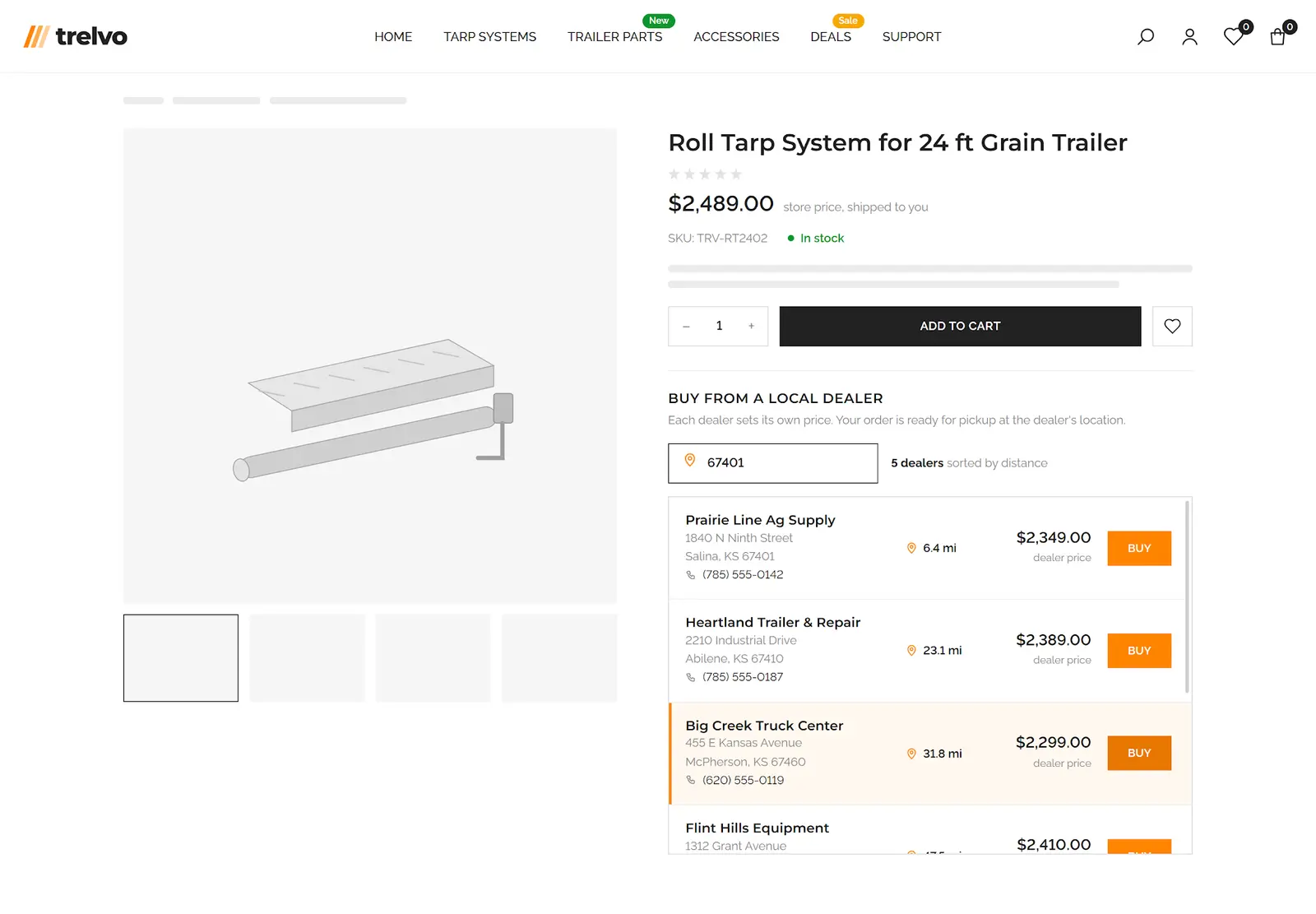
Product page with nearby dealers, their prices and distance after a ZIP code search

Project

Delivered for
Digital agency, white label
Client
Long-established US manufacturer of agricultural and transport trailers
Platform
Magento 2 Open Source 2.4.8 (moved from WooCommerce)
Catalog
4,500+ products, four stores in one installation
Timeline
6–8 months to launch the first two stores, then two more stores about six months apart
Team
2–3 back-end, 1–2 front-end developers

About the Client

The client is a long-established US manufacturer of trailers for agriculture and transportation. The company designs and builds trailers for bulk cargo, flatbed trailers for equipment and vehicles, and tarp systems, together with the components and spare parts for them. Trailers are built to the customer's needs: every model comes with a wide choice of options and mounted equipment.

Design and manufacturing happen at the company's own plants in the US. Trailer assembly, new product development and the spare parts warehouse share one production site, so most parts ship from stock quickly. The products are sold through the company's own service centers and a network of independent dealers that covers most of North America.

Historically, the company sold through dealers. Before the project, its two online stores ran on WooCommerce, and the platform no longer kept up: it lacked the B2B features the company needed and the flexibility for its non-standard sales scenarios. An online store gave the company direct contact with the end buyer, and the store had to be built so that online sales strengthened the dealer network instead of taking customers away from it. The same store also serves the dealers themselves, with their own prices, minimum quantities and delivery terms.

The company in numbers

  • More than 4,500 products in the online store: trailers, tarps, components and spare parts.
  • More than 100 dealers and more than 130 sales and service locations across most of North America.
  • Its own plants, service centers and spare parts warehouse.
  • Four stores on one platform, with a shared admin panel and catalog.

Main Challenges the Customer Faced

Business challenges

  1. Business challenge 1

    Selling online without competing with its own dealers

    For a trailer manufacturer, dealers are the main sales and service channel. They hand over the equipment, service it and sell parts in their region. If the manufacturer's own store starts selling directly at its own price, it takes customers away from the dealers and puts the company at odds with its partners.

    The two WooCommerce stores did not have the B2B features or the flexibility this required. The client needed a model in which an online buyer sees the dealers near them, buys from a dealer at that dealer's price and picks the order up at the dealer's location. At the same time, the dealers themselves had to work on the same platform as wholesale customers, with their own prices, minimum quantities and delivery terms.

  2. Business challenge 2

    Selling high-ticket equipment online

    A trailer costs as much as a car, and almost nobody is ready to pay for one in full on a website without seeing it in person. Yet the buyer wants to choose the model and configuration in advance and understand the final cost. The service center, in turn, wants a buyer who has already decided, not an anonymous request from a contact form.

    The task was to turn the trailer page into a real point of sale: present the model, build a configuration with installed equipment, and secure the trailer for the buyer with a small prepayment.

  3. Business challenge 3

    Made-to-order products and complex spare parts

    Part of the range does not fit a standard product page. A tarp is made to the length of a specific trailer, and creating a separate product for every size is impossible, so these orders came in through a request form and the price was calculated by hand. Spare parts for tarp systems consist of dozens of similar components, and it is hard for a buyer to tell from a catalog number which one they need.

    The store had to sell both kinds of products online as easily as regular ones: with an instant price and without a call to the sales department.

  4. Business challenge 4

    Trust and real content from real customers

    People who buy equipment trust other owners more than advertising. Photos of installed products and honest reviews sell better than studio shots. The company wanted a steady flow of this kind of content on the site, without the risk of publishing a random or inappropriate photo, and with the author's explicit consent so the same photos could be used in ads and on social media.

Technical challenges

  1. Technical challenge 1

    Extending ready-made modules without forking

    The store runs on Magento with almost a hundred third-party extensions: company accounts, a dealer map and in-store pickup, custom product options, a form builder, shipping rules. Almost every solution we built changes the behavior of one of these modules: it links a dealer to a location on the map, adds a new option type or puts moderation into a form.

    We built every change through plugins, events, JS mixins and separate bridge modules, without touching anyone else's code. Third-party extensions update the normal way, and our solutions keep working after the updates.

  2. Technical challenge 2

    Non-standard money flows inside a standard checkout

    The project has several scenarios in which the order total is calculated differently from what the platform expects. The dealer price depends on the chosen pickup location. For a trailer, only a deposit is paid online, and the balance goes on a separate invoice. The price of a tarp is calculated by a formula from its dimensions. Accessories with installation are counted as a separate group.

    All of these calculations have to work the same way in the cart, at checkout, in the order, in invoices, in emails and in the customer account, without breaking taxes, discounts or payment gateways. We built them on custom totals collectors, a custom product type and a custom price model, which are the same mechanisms Magento uses to calculate a regular order.

  3. Technical challenge 3

    Dealer pricing at catalog scale

    Every dealer has its own discount level, some products have a separate base price for dealers, and the prices change together with the manufacturer's price list. Maintaining tens of thousands of prices by hand is impossible.

    We made group prices recalculate automatically when a product is saved and after every import: eight discount levels, almost 3,000 products with a separate wholesale price, and about 37,000 prices that nobody has to touch by hand. Prices for individual dealers are loaded through the standard Magento import with data validation.

Delivery challenges

  1. Delivery challenge 1

    Four stores, a phased launch and continuous delivery

    There are four stores on the platform. The first two replaced the client's WooCommerce stores: they were built in parallel from scratch on Magento and went live after six to eight months. The base version went into production first, and new features were then shipped in regular releases without stopping sales. The third store was added about six months later, and the fourth about six months after that, on the same platform, admin panel and catalog.

    Large features, such as reservations with a deposit, were released in parts: first a working version, then improvements based on the client's acceptance testing. Every change went through a pull request with code review, and over the course of the project several hundred of them were merged.

  2. Delivery challenge 2

    Three environments and client acceptance for every change

    The store sells every day, so changes could not go straight to the live site. Every task was developed in a separate branch and went through code review, then to the development environment, then to the staging environment, where the client ran acceptance testing, and only after that to production.

    The team changed over the course of the project, between two and three back-end developers and one or two front-end developers at different times. A single process made it possible to bring in new developers without losing quality.

What we did

Solution 1

Online sales through the dealer network

The manufacturer's online store does not compete with dealers. It brings buyers to them. On the product page, a retail buyer sees the dealers near them and each dealer's price, and then places an order in one click with pickup at the chosen location at that dealer's price. For the dealers themselves, the same platform works as a wholesale account with their own prices, minimum quantities, delivery and payment, while a retail buyer sees only retail terms.

For the buyer

  • A list of dealers right on the product page: address, phone and price at each location. After the buyer enters a ZIP code, the list is sorted by distance.
  • The dealer price updates when the buyer picks a product variant, and it is recalculated for bundles.
  • The Buy button on a dealer's card adds the product to the cart at that dealer's price, and pickup at that location is already selected at checkout.
  • The location can be changed right at checkout, and the price is recalculated for the new dealer. If the buyer chooses delivery, the regular store price applies, and the site warns about this in advance.
  • The payment method depends on how the order is received: delivery is paid online, and with pickup the buyer pays the dealer on collection.

For the store team

  • A company becomes a dealer with one switch, and map locations are linked to it from a list in a modal window.
  • A dealer manages its own locations in its account: address, contacts, coordinates and status. Changes go live on the storefront right away.
  • Dealer prices are uploaded as a CSV file through the standard Magento import, with SKU and company validation, and are then available in a separate registry.
  • Wholesale prices are calculated automatically: eight discount levels, a separate base price for almost 3,000 products, and about 37,000 group prices recalculated when a product is saved and after every import.
  • Shipping and catalog rules tell a dealer from a retail buyer: a minimum order quantity for dealers, delivery under the manufacturer's freight policy with the cost settled in the final invoice, and products that only dealers can see.

How it works

  • The dealer price is calculated in the cart as a separate totals step and depends on the selected pickup location. It is stored in the order together with the dealer and the location, and the price model already supports quantity tiers.
  • The third-party store locator module is extended without changes to its code: the link between a dealer and a location is kept in a separate table with integrity constraints, and dealer data is added to the location information through plugins.
  • The storefront is built on Knockout: a single REST request returns the prices of all dealers for a product or the selected variant, the result is cached, and the distance is calculated in the browser from coordinates.
  • Prices are imported through a custom entity of the standard Magento import: data validation, batch writes and a delete mode.
  • The customer type is checked by one condition, "customer is a company", built into shipping, restriction, catalog and group rules. A shared company resolver decoupled the logic from a specific B2B module.

Solution 2

Online trailer reservation with a deposit

A trailer costs as much as a car, and buyers are rarely ready to pay for one in full online without seeing it. We gave them a way to secure the configuration they chose with a fixed deposit right in the online store and pay the balance at pickup. For the store, this is a fully paid order, not a contact form request: the reservation, payments and invoices are all kept in standard Magento accounting.

For the buyer

  • The deposit amount is shown right away on the trailer page and in the configurator summary, before the cart.
  • In the cart and at checkout, the total is split into clear parts: the full price, the amount due today with the deposit highlighted, and the balance due at pickup.
  • Accessories in the same cart are paid in full right away, while for the trailer only the deposit is paid online. Tax on the trailer and discounts are applied in the final settlement.
  • Checkout is short: the delivery method is already limited to pickup, so the buyer only picks the pickup location and pays online, including as a guest.
  • After the order, the buyer receives a confirmation and a receipt for the paid part, and the customer account shows the deposit, the balance and both invoices.

For the store team

  • Reservations are switched on for a single product or for a whole product line at once. The deposit amount is set once for the store and can be changed for an individual model.
  • Orders with a reservation automatically follow their own rules: pickup only and online payment only. Regular accessory orders follow the standard rules.
  • The deposit invoice is created automatically at checkout. When the buyer collects the trailer, a manager issues the final invoice with the regular button, and the system deducts the deposit and protects the quantity from manual edits.
  • How the balance is captured, refunds, total labels and customer-facing texts are configured in the admin without developers, separately for retail and for dealers.
  • After the final invoice and the handover, the order closes automatically.

How it works

  • Partial payment without changes to the payment module: while the payment is passed to the gateway, the order total is temporarily replaced by the amount due today and restored right after. The approach works with any Magento payment method, and the order keeps the full price.
  • The deposit, the amount due today and the balance are calculated by custom Magento totals collectors. The values are stored in the cart, the order and the invoice together with the line items and are shown by Knockout components at checkout, as well as in emails, the customer account and printed documents.
  • The two invoices are built on standard Magento mechanics: the first automatically becomes the deposit invoice, and the trailer stays in the "to invoice" status. That is why the final invoice is created with the standard button and accounts for the deposit, tax and discount by itself.
  • Shipping and payment rules switch on the fly based on the cart contents: shipping methods have a separate availability flag for reservations, the list of payment methods is filtered by plugins, and for wholesale customers the settings are replaced based on the company context.
  • The generic module is separated from the project settings, so the mechanism can be switched on for any high-ticket product without code changes.

Solution 3

Made-to-measure tarps with formula pricing

Tarps made to a trailer's length used to go through a request form and a manual price calculation. We added a new product type to Magento, a made-to-measure product. The buyer sets the tarp length to the inch, chooses the width, material and reinforcements, and the price updates on the page with every change.

The price follows the formula "length Γ— width Γ— coefficient", where the coefficient is the sum of the selected options and a length tier: the longer the tarp, the lower the rate per unit of area. The same calculation runs again on the server, so the amount in the cart and in the order matches the price on the page, and a made-to-measure tarp is bought online as easily as a regular product.

For the buyer

  • The length is set with two sliders, in feet and in inches: more than 500 length options, with the finished tarp size shown right under the sliders.
  • The price changes instantly when the buyer moves a slider or changes the material or options, without a page reload and without waiting for a quote from a manager.
  • The options adapt to the choice: for the heavy material only the available colors remain, and an extra field appears only when it is needed.
  • In the cart and in the order, the tarp is a regular line item with a full breakdown of its parameters. The configuration can be opened from the cart and edited, with all values filled in.
  • Reordering reproduces the same tarp at the same price.

For the store team

  • A made-to-measure product is created in the familiar product form: the length range and the coefficients for each option value are set in the custom options section.
  • Length price tiers are edited as a table in the store settings, without a developer.
  • The set of options is stored as a template that is applied to new made-to-measure products.
  • A tarp order can also be placed from the admin, with the same size selection and the same formula.
  • Storefront rules are switched on in the settings: one made-to-measure tarp per cart with a clear message, and the price hidden in listings and search, where the product does not have a final price yet.

How it works

  • A custom product type based on the Magento simple product: stock, taxes, checkout and reorder work as standard, while its own price model and its own price indexer are connected through standard extension points.
  • One formula in two places: the PHP price model and the JavaScript widget calculate the same way and take the tiers from one setting, while the final amount is always calculated on the server.
  • New custom option types, "coefficient" and "length range", are built into the standard options mechanism, with their own database and product form fields, their own validator and price type.
  • The link to the third-party custom options module is moved into a separate bridge module: the tarp uses option templates and dependencies, while the price is calculated only by our model, bypassing the module's logic.
  • In product listings and search, the made-to-measure price is hidden by a plugin on price rendering, so the buyer sees the price only after choosing a size.

Solution 4

Trailer builder with installed accessories

A trailer is rarely bought without extra equipment: right away it needs a spare tire mount, a toolbox, a winch and other mounted equipment. Together with reservations, this was the second half of turning the trailer page into a point of sale. We turned the model page into a builder: the buyer studies the trailer, picks the equipment they need, sees the total and places everything in one order, and the accessories are installed on the trailer before pickup.

Every accessory is sold in two versions, "part" and "part with installation", with shared stock and matching prices, so the team does not have to maintain two product ranges.

For the buyer

  • The model page works like a presentation: a large photo, key specifications above the fold, the full specification, illustrated features, answers to common questions, and buttons to buy, check financing and find a dealer. Section navigation is always at hand.
  • A three-step builder: model, accessory selection in a carousel, order summary. The total is recalculated with every change, and quantities can be changed right in the summary.
  • If one accessory needs another to be mounted, the builder points this out and adds the missing part in one click.
  • The cart and the order show which items come with installation and which do not, and the totals show both amounts separately. Removing the trailer also removes the installation for it, and a reorder restores the whole build.
  • The trailer list is grouped by type: every model shows its key specifications and a link straight to the builder.

For the store team

  • The "with installation" versions are created with one command from the price list, and after that the platform keeps each pair in sync: stock, dealer group prices, builder contents and a redirect from the technical product page.
  • The set of accessories for a model is defined with the familiar related products, and compatibility rules are filled in as a table in the settings.
  • Specifications are product attributes and work on the product page, in listings and in filters. Feature blocks are created by a template generator, edited in the visual page builder and linked to a model by picking it from a list, and photos are assigned by role through import.
  • An item with installation arrives in the order with the SKU of the real part and an installation mark: the warehouse picks the right part, and the manager sees right away what to mount on the trailer.
  • Grouping the list by model is switched on with a checkbox on the category, without template changes.

How it works

  • The installed version is a regular Magento product with a flag and a link to the part, so prices, taxes, Multi-Source Inventory and reports work as standard. A plugin on product save keeps the pair consistent: it copies stock sources and group prices, transfers links to trailers and creates a 301 redirect.
  • The builder is built on top of the standard related products mechanism: a JavaScript widget collects the selection and quantities and sends them through the standard add to cart, without a separate API.
  • The link between a trailer and its installed accessories is stored in the cart and order item. Joint removal and a custom reorder in place of the standard one are built on it.
  • Before the order is placed, the item is replaced with the SKU of the real part with an installation flag, so stock reservation and accounting work with the actual part number.
  • Two custom total lines, with their own columns in the cart and the order, an extended REST response and Knockout components, are built into the deposit calculation: the buyer sees what makes up the payment due on the day of the order.

Solution 5

Interactive exploded-view parts diagrams

Buyers of tarp system parts struggled to tell similar components apart by catalog number. We turned the parts kit page into an interactive drawing of the assembly. The buyer sees the assembly in an exploded view with numbered callouts, clicks the part they need and lands right on its row with price, stock and a quantity field. The parts list is built straight from the drawing and goes to the cart with one button, so the buyer orders exactly the part that is on their trailer, without calling the parts department.

For the buyer

  • Parts are found by their place on the diagram, not by catalog number: the assembly is shown in an exploded view, and every callout is clickable.
  • A click on a callout highlights it on the drawing and highlights every version of the part in the table, and the page scrolls to the row and puts the cursor in the quantity field.
  • Every row shows the price for the buyer's customer group, stock, minus and plus buttons, and a link to the detailed part page.
  • A single part can go to the cart right from its row, or the whole selected list can be sent with one button.
  • The drawing adapts to the screen: on a phone the callouts stay in place, and secondary columns are hidden.

For the store team

  • A visual editor in the product form: a manager uploads the drawing, adds callouts and drags them into place with the mouse, and sets the area size or a text label.
  • A callout is linked to a part with one field, the number on the drawing, in the kit row. Several versions of a part can be shown under one number, and one part can belong to several diagrams.
  • The diagram appears by itself as soon as a kit has callouts, and other products are shown as usual.
  • Kit rows are ordered by callout number with one service command, so the table reads like the parts list printed with the drawing.
  • The feature is switched on in the store settings, and any product attribute can be chosen for the manufacturer part number column.

How it works

  • Callout coordinates are stored in pixels of the original drawing and converted to percentages on the storefront, so the diagram is responsive without a separate mobile layout.
  • The drawing number is attached to the link between the kit and the part itself and is deleted in cascade: if a part is removed from the kit, its callout disappears too, so there are no dangling references.
  • The diagram page is connected through a separate Magento layout handle only for kits with callouts. The rest of the catalog is not affected, and a specific assembly can have its own layout.
  • The cart, customer group prices and stock work through the standard Magento grouped product mechanism, so every part goes into the order as a separate line with its own number and price.
  • The solution is a separate Composer package with its own settings and access permissions, and it makes no changes to the Magento core.

Solution 6

Moderated customer photos and photo reviews

To give buyers proof from other owners, customers send photos of their equipment with the products installed and leave reviews with pictures, and the store gets a live showcase of trust in the brand. Every photo is moderated before it is published: a manager receives an email with the picture and approves it with one button, without opening the admin panel.

The buyer gives consent to showing the photo on the site and to using it in advertising right in the form, so approved shots can go straight to social media and promotional materials. The gallery and reviews run on one moderation mechanism, and new content sources can be connected to it.

For the buyer

  • A short form: name, city, email and up to two photos, and in reviews the photos are added by drag and drop with a preview.
  • A review can be left on the product page or on a separate page where the product is picked from a searchable list with thumbnails.
  • Personal data is protected: the site shows only the first name and the first letter of the last name, or the first name and city, and the email is never published.
  • A slider shows real installations by other buyers: the best shots first and one photo per author, so the selection stays varied.
  • Clear terms: two explicit consents, one for showing photos on the site and one for marketing use.

For the store team

  • A digest email collects new submissions: photo, name, city and email, plus the text and ratings for reviews. Each submission has an Approve button that works without logging in to the admin.
  • A separate submissions grid: thumbnails, filters, mass approval, rejection and deletion, a "featured" mark and display order edited inline.
  • The standard reviews grid is extended with email, name and moderation request status. The email can be sent again, and photos in a review can be added or removed by hand.
  • Marketing consent is stored with the submission, so the team can see which photos can be used in ads.
  • Everything is configured without a developer: the recipient and email template, the sending schedule, the number of photos in the slider, the limit per author, the page shown after approval and the product category for the review form.

How it works

  • Private storage: after submission, the files are moved from a public folder to a private Magento directory and served through a controller, and photos waiting for moderation are available only through a personal link.
  • Moderation by link: every submission gets a random token, and the link in the email approves the submission, expires the token, recalculates the product rating and refreshes the page cache so the photo appears on the site right away.
  • A cron queue: a scheduled task collects new submissions into one email on the schedule from the settings, and any submission can be put back into the queue from the admin with one button.
  • Image optimization: on approval the picture is resized to 1,200 px on the longer side, while the original stays with the moderator. Photos on the storefront load as the visitor scrolls and are cached by the browser for 30 days.
  • Spam protection and careful integration: an invisible CAPTCHA and one submission per IP address per day on the gallery form, limits on the number and types of files, server-side consent checks and a weekly cleanup of unused files. The extensions are connected through events and plugins, without changes to the third-party form module or the Magento core.

Key Results and Business Value

  1. #1

    More than 100 dealers in online sales

    More than 130 locations across most of North America are shown right on product pages: the online store brings buyers to dealers instead of competing with them.

  2. #2

    About 37,000 dealer prices without manual work

    Eight discount levels and almost 3,000 products with a separate dealer price are recalculated automatically every time the price list changes.

  3. #3

    Online reservations for the whole trailer line

    The buyer secures a trailer with a deposit of a few percent of its price, and the full cycle from reservation to final invoice runs in the platform's standard accounting.

  4. #4

    More than 500 length options without separate products

    A made-to-measure tarp is sold as one product with thousands of price variants, calculated instantly and identically on the site and in the order.

  5. #5

    A builder for every trailer model

    The model page carries more than 20 specifications, a features block and accessory selection with installation, all placed in one order together with the trailer.

  6. #6

    Parts from the drawing

    Every spare parts kit in the catalog got an interactive diagram, and more than 100 parts can be picked straight from a drawing.

  7. #7

    One-click photo moderation

    Customer photos and reviews are published after a manager checks them right from an email, with the author's consent to use them in advertising.

  8. #8

    Four stores on one platform

    The first two stores launched after six to eight months, and two more were added about six months apart, sharing one admin panel and catalog.

Features Delivered

  1. #1

    Dealers on the product page

    A list of the nearest dealers with prices, sorting by distance and purchase with pickup from the chosen dealer.

  2. #2

    Dealer account

    Dealers manage their own pickup locations: addresses, contacts, coordinates and status.

  3. #3

    Wholesale pricing

    Dealer price import, eight discount levels, a separate dealer base price and automatic recalculation of group prices.

  4. #4

    Dealer and retail rules

    Minimum order quantity, separate shipping and payment rules, dealer-only products and payment depending on how the order is received.

  5. #5

    Reservations with a deposit

    Partial online payment, the balance at pickup, two invoices per order and separate shipping and payment rules for reservations.

  6. #6

    Made-to-measure products

    A new product type with size sliders, formula pricing, length tiers and option templates.

  7. #7

    Trailer builder

    A model page with specifications, features and answers to common questions, accessory selection with a running total, and catalog grouping by model.

  8. #8

    Accessories with installation

    "Part" and "with installation" versions with shared stock and prices, required accessory suggestions, joint removal and reorder.

  9. #9

    Interactive parts diagrams

    An assembly drawing with clickable callouts, a visual editor in the admin and buying parts straight from the diagram.

  10. #10

    Customer photos and photo reviews

    An installation gallery, reviews with photos, marketing consent, a digest email for the moderator and one-click approval.

  11. #11

    Catalog navigation

    Listing grouped by model and a category tree on the part number search results page.

  12. #12

    Price on request

    For selected categories, a button to call a manager is shown instead of the price.

  13. #13

    Content without developers

    More than 160 pages and blocks deployed by code and then edited in the visual page builder, plus an HTML editing mode for editors.

  14. #14

    Storefront speed

    Font preloading, removal of render-blocking styles, no layout shifts in the header and lazy-loaded images.

  15. #15

    Payments and taxes

    Online payment by card and digital wallet, invoice payment for dealers, automatic tax calculation by an external service and a link to purchase financing.

The technology we used

Platform
Magento 2 Open Source 2.4.8, PHP 8.3, MySQL 8, four storefronts with a shared admin panel and catalog.
Search and performance
OpenSearch, Varnish full-page cache, nginx, PHP-FPM.
Catalog and inventory
Configurable and grouped products, a custom product type with its own price model and indexer, custom options with dependencies, Multi-Source Inventory and in-store pickup from dealer locations.
B2B
Company accounts with roles and credit, group prices, custom import entities for prices and minimum quantities.
Front end
Custom themes based on Luma and our base theme, LESS, KnockoutJS and Magento UI components, RequireJS, jQuery UI, responsive layout.
Integrations
Magento REST API, payment gateways for cards and digital wallets, a tax calculation service, a mapping service with address search, invisible CAPTCHA.
Customization architecture
More than 50 custom modules and packages from our private repository, built through plugins, event observers, JS mixins, custom totals collectors, declarative database schema and data patches, without changes to third-party code.
Infrastructure and process
GitHub with pull requests and code review, Deployer with atomic releases and one-command rollback, separate development, staging and production environments.

Do you sell through dealers and want to sell online too?

If your dealers are your main channel and you want an online store that sends buyers to them, or your products need a deposit, a size calculator or a parts diagram to be sold online, we can show how this would work on your catalog. We start with a fixed estimate and reply within one business day.

Need something similar? Let's discuss.

Tell us what you want to build, and for whom. If we're a fit, you get a clear next step. If not, we'll tell you.

  • Reply within one business day
  • Fixed estimate before we start
  • No commitment