
• Agency · white label
  • Magento 1 to Magento 2
  • Migration
  • Spare parts
  • International
  • B2B + B2C

Magento 1 to Magento 2 Migration for a Worldwide Supplier of Marine Engine Parts

150,000+ old URLs, 70,000+ orders and tens of thousands of customer accounts moved from Magento 1 to Magento 2 in about six months, with six languages and delivery to more than 100 countries.

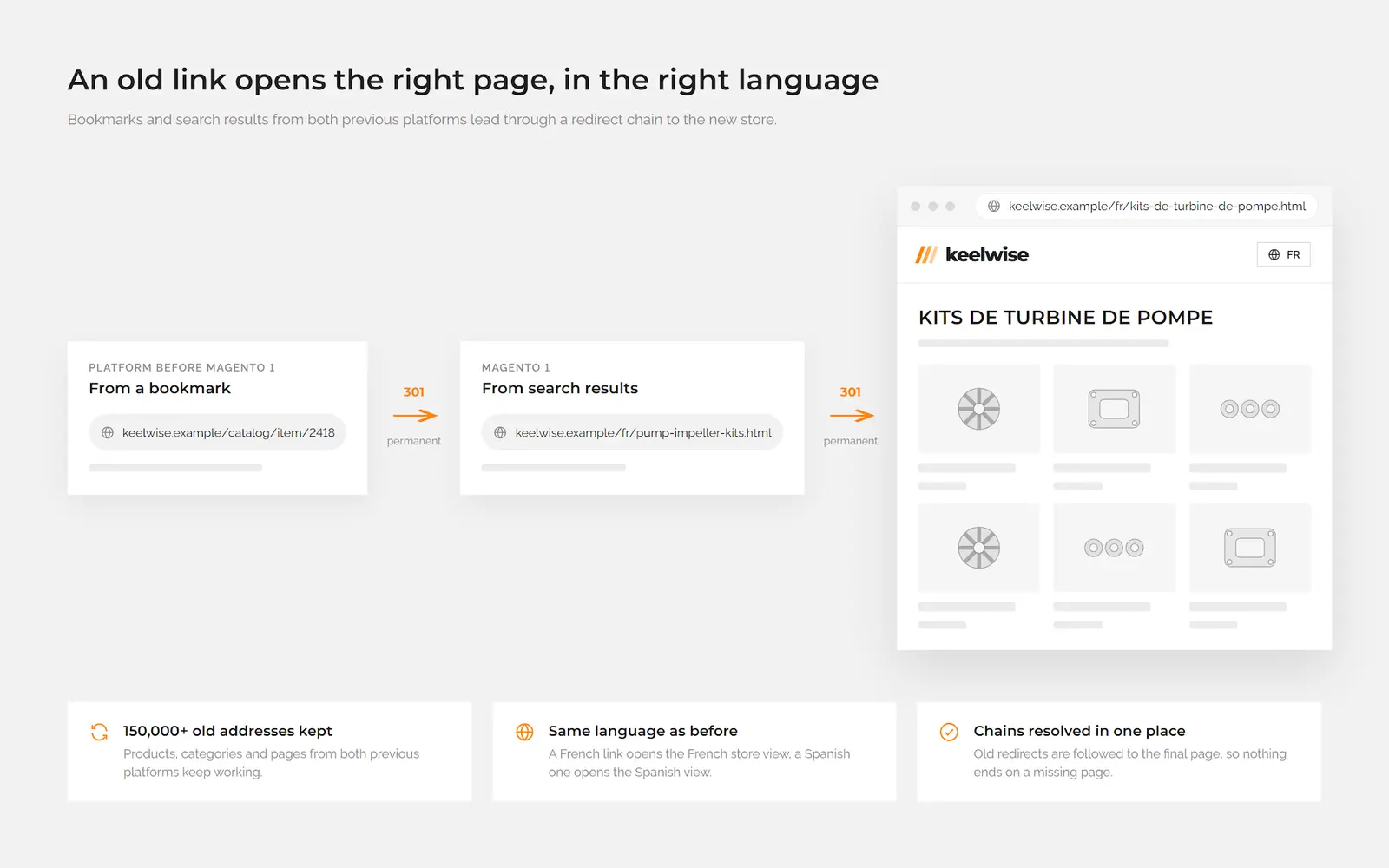
Diagram: an old link from either previous platform follows a 301 redirect chain to the right page in the same language

Project

Delivered for
Digital agency, white label
Client
US supplier of marine and industrial diesel engine parts, selling worldwide
Platform
Magento 2 Open Source 2.4.6 (moved from Magento 1)
Scope
150,000+ old URLs, 70,000+ orders, six languages, delivery to 100+ countries
Timeline
About six months, 2026
Team
1 back-end developer, 1 front-end developer, 1 QA engineer

About the Client

The client is a US company that sells parts for diesel engines and transmissions, mostly marine ones. The catalog covers parts for engines from the world's leading manufacturers, marine reverse gears and transmissions, generator sets, as well as marine and water pumps, gauges, cables and controls. The company sells new and remanufactured aftermarket parts and engine rebuild kits, including parts for models that manufacturers stopped making long ago.

Its buyers are owners of yachts and work boats, companies that run their own fleets, mechanics, service shops and resellers. An engine waiting for a part means a vessel or a machine out of work, so the buyer cares about an exact fit, stock on the shelf and fast delivery. The company runs its own warehouse, ships orders anywhere in the world and helps buyers pick the right part by phone and in messengers.

The online store has been running for many years, and the new version on Magento 2 is its third platform. Over that time it collected tens of thousands of customers, a long order history and search engine URLs from two previous systems. Expensive and complex orders often go through a conversation with a specialist, so the website, the sales team and the warehouse have to work as one.

Magento 1 no longer received updates, which left the store with open security questions, and the company wanted new features and room to keep growing. Staying on the old platform was no longer an option.

The company in numbers

  • Tens of thousands of customers around the world.
  • More than 70,000 orders in the online store's history.
  • Delivery to more than 100 countries.
  • Six language versions of the store.
  • Its own warehouse and a team of parts specialists.

Main Challenges the Customer Faced

Business challenges

  1. Business challenge 1

    Moving to a new platform without losing traffic, customers or history

    For years the store ran on Magento 1, which no longer gets updates or security fixes, and before that on an even older platform. Over that time it collected tens of thousands of customers, more than 70,000 orders and more than 150,000 page URLs that buyers reach from search results and bookmarks.

    Losing those links during the move would mean losing search traffic. Forcing regular customers to reset their passwords and search for their past orders again would mean sending them to competitors. The client needed to move the whole store: the catalog, the customers, the order history and the content in six languages, keep the old URLs working, and make the return of a regular customer to the new site feel like nothing had changed.

  2. Business challenge 2

    Finding the right part for a specific engine

    A buyer of diesel parts is not looking for "a water pump". They are looking for a pump for their engine in a specific version. One engine can come in several versions, parts differ by the numbers on the engine plate, and the same part is sold by different manufacturers under different numbers.

    In the old store, the catalog consisted of thousands of categories with makes and models written right into their names, and it was hard to find the right part without calling the store. A wrong part means a return, a second shipment across the ocean and days of downtime for a vessel. The store needed a parts finder that leads from the engine to the part, understands plate numbers and other manufacturers' numbers, and right away suggests what else the repair will need.

  3. Business challenge 3

    Expert-led sales of expensive and complex orders

    An engine rebuild kit or a marine pump costs hundreds or thousands of dollars, and many buyers want to talk to a specialist before paying: confirm the engine version, send a photo of the plate, get a quote with a price. Some customers order only by phone.

    Without tools on the site, a sales rep put such an order together by hand, and the buyer did not see what exactly had been ordered for them until the invoice arrived. The client wanted expert help to open in one click from any page, and wanted sales reps to sell right inside the store: build a cart, send a quote and place a phone order in a way that lets the customer confirm it before any money is charged.

  4. Business challenge 4

    Selling worldwide: delivery, duties and payment for large orders

    About a third of orders ship abroad or are collected from the warehouse. Buyers speak different languages and pay in different currencies. Shipping cost depends on weight, dimensions and region, heavy parts travel by freight, and a buyer abroad needs to know duties and taxes in advance so the parcel does not get stuck in customs.

    Large orders are often paid by bank transfer or with several cards at once, and an order is often collected from the warehouse not by the buyer but by their driver or carrier. The client needed a checkout that follows its own path for domestic delivery, international delivery and pickup, calculates shipping and duties up front and accepts payment the way a buyer of a large order needs.

  5. Business challenge 5

    Turning one-time buyers into regular customers

    A diesel engine runs for decades, and its owner keeps buying filters, gaskets, pumps and rebuild kits for it year after year. If the store does not remember what equipment a customer has, the buyer starts the search from scratch every time and easily goes wherever the part turns up faster.

    Fleet owners and service shops have a bigger job: dozens of units, mechanics, work orders and documents. The store needed to become the place where a customer keeps all of their equipment and orders the parts for exactly that equipment in one click.

  6. Business challenge 6

    Sales, warehouse and accounting as one system

    Orders from the site are processed by the warehouse in the ERP system, and deals are run by the sales team in the CRM. When these systems are not connected, a sales rep moves orders by hand, prices on the site drift away from the price list, the buyer waits for an invoice and a tracking number, and abandoned carts with expensive parts go unnoticed.

    The client needed orders, carts and help requests to travel from the site to the warehouse and the CRM and back on their own, and wanted a sales rep to see the whole customer: their equipment, their cart and their history.

Technical challenges

  1. Technical challenge 1

    Migrating data from two previous platforms

    The old store's data had its own structure: dozens of custom tables, translations in six languages, categories with makes and models in their names, and redirects that went all the way back to the platform the store used before Magento 1. Magento's standard Data Migration Tool cannot move data like this without changes.

    We extended it with our own mapping and transformations, kept the original category and order IDs, moved the page content and built redirect chains from the URLs of both previous platforms. While the old and the new store ran in parallel, the catalog was brought up to date by a repeat migration run.

  2. Technical challenge 2

    A new catalog structure without changing URLs

    Engine navigation could not be built on the old category tree: series, models and versions were written there as free text in category names, and the categories themselves were indexed by search engines in six languages. Moving products into a new structure would have broken the URLs.

    We parsed the category names with rules written for each manufacturer, moved series, models and versions into attributes, and built a virtual navigation tree on top of the real categories. About a thousand tree nodes, each with its own name in every language, point to the existing catalog pages, so the new menu appeared without moving products and without losing indexed URLs.

  3. Technical challenge 3

    Personal features on fully cached pages

    Catalog pages are served from the full-page cache, otherwise a catalog in six languages would not be fast. At the same time, the same pages carry a lot of personal features: the customer's equipment garage, the parts check by plate number, the recommendations window, and the panel of a sales rep who is signed in as the customer.

    We moved personal data into customer data sections and the REST API, and the plate number check and recommendations run in the browser. For the sales rep mode, the cache is split by the rep's token, so buyers and sales reps never receive each other's pages.

  4. Technical challenge 4

    Non-standard payments inside a standard checkout

    A phone order has to place a hold on the card and charge it only after the customer confirms. A large order is paid with two or more cards, and if one card is declined, the holds already approved on the others are released. Some parts automatically get a core deposit for the returned old part, and a bank transfer order has its own status and lets a sales rep adjust the shipping cost before payment.

    We built these scenarios as plugins at the level of payment methods, orders and the cart, without rewriting the payment modules, so invoices, refunds, emails and the export to the ERP work for them exactly as they do for a regular order.

Delivery challenges

  1. Delivery challenge 1

    Moving a live store without stopping sales

    The store sells every day to buyers in different time zones, so it could not be shut down for the move. Data migration ran in two phases: first a full migration and a check on the test environment, then a repeat sync of the catalog, which had kept changing in the old store in the meantime.

    After launch, new features went out in regular releases, and large features, such as assisted sales and the equipment garage, were released in parts and improved after the client's acceptance testing.

  2. Delivery challenge 2

    Continuous delivery with code review and client acceptance

    The whole project was delivered in about six months by a team of three: one back-end developer, one front-end developer and one QA engineer. With a team this small and this much scope, the process had to keep quality steady without slowing anyone down.

    Every task was built in a separate branch, went through code review in a pull request and a check on the test environment, where the client accepted the work, and only then reached the live site. Hundreds of changes went through this path. We moved repeating mechanisms (sign-in by link, device tracking, SMS, file uploads, chat, call guides) into our own packages, which are installed through Composer and updated independently of the store's code.

What we did

Solution 1

Moving from Magento 1 to Magento 2 with SEO, customers and order history intact

This solution answers Business Challenge 1, Technical Challenge 1 and Delivery Challenge 1.

We moved the multilingual store from Magento 1 to Magento 2 so that buyers and search engines barely noticed the move. Old links and bookmarks work, customers keep their accounts and their full order history, and the team got the same catalog, the same content in six languages and the same admin roles. The migration is built from Magento's standard migration tool with our data map and a set of our own commands. It can be repeated on fresh data while the old store keeps taking orders.

For the buyer

  • Old product, category and page URLs from search results and bookmarks open the right page in the same language. More than 150,000 URLs and redirect chains are kept, including the URLs of the platform the store used before Magento 1.
  • The account is still there: email, addresses, order history with invoices and statuses. "Buy again" works for orders placed in the old store too.
  • The site recognizes a returning customer by email, greets them by name and offers, in one step, to set a new password or sign in with a one-time link, without a call to support.
  • Internal links in descriptions, articles and pages lead to the site version in the buyer's language.

For the store team

  • The catalog moved with the same product and category IDs and with translations on every language store view. Links in feeds, content and order history stayed correct.
  • More than 70,000 orders and tens of thousands of accounts with addresses are available in the admin, together with more than 50,000 product ratings, search terms, shipping rules and category mapping for product feeds. New order numbers do not overlap with the old ones.
  • Admin users and roles from the old admin moved with a map of permissions to Magento 2 sections.
  • More than 1,500 pages in six languages were converted to the Page Builder visual editor, and the blog moved from an external CMS and is available in every language. Every link replacement has a report for review.

How it works

  • The migration runs in two phases. First, a full migration with our map: renamed tables and fields, conversion of serialized order and rule data, re-encryption, and delta mode for new orders. Then a repeat sync of the catalog only, from a whitelist of tables, which leaves the new store's orders, customers and content untouched.
  • URLs are restored from the links that are actually in use: from the site export and from the content on all store views. For every link, the old site's redirect chain is followed to the final page, and the record type is detected automatically.
  • Categories are imported straight from the old store's database with the same IDs and position in the tree, and attributes are matched by code on all store views.
  • Passwords are moved in a format Magento 2 understands and re-hashed with a modern algorithm at first sign-in. Migrated customers are flagged, and a separate sign-in flow is switched on for them.
  • The cutover is described as a reproducible sequence of commands and checks that write reports to files. For URLs in mixed encoding, we prepared a patch to the migration tool.

Solution 2

From engine make to the exact part in a few clicks

This solution answers Business Challenge 2 and Technical Challenge 2.

We built our own parts finder in which the buyer starts from their engine, not from the name of a part. We took the thousands of categories of the old store apart and put them together into one tree: manufacturer, series, engine, version, part group. We added cross-cutting sections by part type and a search by the numbers printed on the engine plate and in other manufacturers' catalogs. The finder covers more than 200 engines and versions, works on every language store view and replaced the ready-made module the store used before.

For the buyer

  • Ten menu sections: by equipment manufacturer and by part type, such as pumps, cylinder heads and turbochargers. The right engine is two or three clicks away, and an engine with several versions shows them right away.
  • If the buyer does not know the exact version, they choose "not sure" and land on the general engine page with all parts, and the help button connects them to a specialist.
  • The engine page has a heading with the make and model, left navigation by part group and quick links to neighboring models. When the buyer comes from a part type section, the matching group is highlighted and shown first.
  • In a part group, the buyer can enter the number from the engine plate: matching items are highlighted, and the number is remembered and goes into the order together with the part. If nothing matches, the expert form opens right away with the number already filled in.
  • Search inside the chosen engine finds a part by SKU, by another manufacturer's number, by part of a number and by description, and leaves on screen only the groups and items where the number was found. Thousands of cross-reference numbers are set up for almost half of the catalog.
  • If parts for an engine are out of stock for now, the buyer lands on a page with the store's contacts instead of an empty section.

For the store team

  • The tree is maintained in the familiar categories section: every node has a name in every language, a link to a catalog page, its own URL for the "not sure" option and an "out of stock" page for each store view.
  • A new engine is added as a regular category with navigation attributes and appears right away in the menu, the left navigation, the breadcrumbs and search. For bulk changes, console commands build the tree and an import file with all translations.
  • Number search forms are switched on with a flag on the part group, and the button label adapts to the group.
  • Engine numbers from the old store's descriptions were moved into separate fields with a parsing report, and cross-reference numbers come from the ERP and take part in search right away. Search weights for SKU, cross-reference number, name and description are changed in the settings.

How it works

  • A virtual navigation tree on top of the real categories: about a thousand nodes and hundreds of links to engine categories. Structure and translations change without moving products and without losing indexed URLs.
  • The engine is a shared context: one tree configuration feeds the menu, the left navigation, headings, breadcrumbs, search, the customer's equipment garage and recommendations, and the engine travels with the product into the cart and the order.
  • A custom Elasticsearch / OpenSearch query: partial matching on SKU and dozens of cross-reference fields with weights, full-text search in descriptions, and aggregation by the part groups of the chosen engine.
  • Parsing rules written for each manufacturer turned the old store's category names and product descriptions into structured data: series, engine, version, plate numbers.
  • Catalog pages stay in the full-page cache: the plate number check runs in the browser, and search inside an engine goes through the REST API.

Solution 3

Companion parts offered at the moment of purchase

This solution answers Business Challenge 2 and Technical Challenge 3.

We built our own recommendations module. After adding a part to the cart, the buyer sees a window with what is installed together with it: gaskets, seals, fasteners, consumables, and adds them right there. The selection takes into account the engine the buyer is shopping for. Recommendations appear in the catalog, in search, on the product page, in the cart, at the order review step and in reorders.

For the buyer

  • Right after a part is added, a window opens with the added product and the recommended items, each with a photo, description, price in the store view currency, a quantity selector and an add button. Items are added one by one, the window stays open, and the page does not reload.
  • On an engine page, the selection is limited to that engine's parts. The catalog marks items that fit parts already chosen and items already in the cart.
  • Added items do not disappear from the list; they show how many are already in the cart. An added recommendation immediately shows its own companion parts, so a full kit comes together in a few clicks.
  • Instead of a single part, the store can offer a whole group, such as pumps. The buyer picks the manufacturer, series and engine right in the window and adds the right product without going back to the catalog.
  • In the cart and at the order review step, every line has a button with its selection, and the cart and totals update in place. The window is translated into every store view language and works well on a phone.

For the store team

  • Recommendations are maintained with the familiar "related products" links on the product page or by import. Thousands of links already in the catalog work without extra setup: 40% of the catalog has a selection from day one.
  • The order in a selection follows the catalog sort order the team already maintains.
  • To offer a whole group of products, it is enough to create a link product and point it to a catalog node. The manufacturer, series and engine tree is built from the same navigation as the site menu.
  • Disabled items and items that cannot be sold are hidden from selections automatically.
  • Every item added from the recommendations window is marked in the order, so the contribution of recommendations to sales can be counted from orders.

How it works

  • The selection is built from independent steps: links, filtering by engine category, a warehouse stock check, store view data preparation, sorting. A new rule is added as a separate step without touching the rest.
  • Pages stay in the full-page cache: recommendations, labels and cart state arrive through the REST API after the page loads and update together with the cart.
  • The selection for a product page is loaded in advance, identical requests from different blocks on the page are merged, responses are remembered in the browser, and the group tree is cached on the server for each store view.
  • One component serves six display points, each with its own scenario: a window in the catalog and in search, an embedded block on the product page, and a panel next to each line in the cart and at the order review step.
  • Links, images, texts and prices are built in the context of the buyer's store view, and prices are converted to the buyer's currency.

Solution 4

Customer equipment garage with work orders and service history

This solution answers Business Challenge 5.

We built a personal equipment garage for the store's customers. Every engine, transmission or marine installation a customer owns becomes a separate unit with its own catalog of compatible parts, purchase history, work orders, mechanics, specifications and documents. The garage fills itself: the store recognizes the engine from the catalog section where the buyer picks parts and, after the order, adds it to the garage together with the purchased items. For an equipment owner, a fleet manager or a mechanic, the customer account becomes a working tool, and the customer comes back for parts to the place where their equipment is already described.

For the buyer

  • An engine appears in the garage without extra steps: when the buyer views its page in the catalog and after they place an order. Equipment can also be added by hand by choosing the manufacturer, series and model, and a whole fleet can be sent to the store in one file.
  • Every unit has a clear three-part name: machine or vessel, position, note. Two identical engines on one vessel do not get mixed up, and duplicate records are merged into one with a serial number check.
  • From a garage row, one click opens the parts catalog for that equipment, a reorder and the unit card. For every unit, the customer plans the date and type of the next service.
  • The unit card holds work orders with statuses, descriptions, photos and files, a log of completed work, mechanics and the person in charge of the equipment, permits, certificates and insurance. A work order goes out by email right from the card, and a mechanic can be called or messaged in one tap.
  • Specifications are tailored to the manufacturer: each make has its own set of numbers and a picture showing where to find the plate, and instead of typing the numbers, the customer can just photograph the plate.
  • "Buy again" collects parts from past orders, including the history from the old site, with filters by product line, equipment, category and period. For the selected unit, the filter is set automatically.

For the store team

  • A sales rep works with the customer's garage right on the storefront: opens it from a link in the CRM or fills in the equipment details as a separate step after a phone order.
  • A log in the admin shows who changed a customer's equipment (the customer or a sales rep by name), which fields and to what values, as well as merges and deletions. Filters by customer, action and date.
  • An equipment list sent as a file reaches the sales reps by email with attachments and the customer's contacts, and the customer gets a confirmation.
  • The customer's equipment goes to the CRM as a separate object linked to the contact, together with the customer type and a link to their garage. Edits a sales rep makes in the CRM come back to the store.
  • The list of service types, email templates and recipients are configured in the admin, and integrations get an equipment REST API with its own access permission.

How it works

  • The engine is stored as a label on the cart and order line. It comes from the add-to-cart form or from the navigation context, and after checkout a plugin creates or finds the unit in the garage and links the purchased items to it.
  • Merging units is built from independent handlers: notes, files, order lines, records and work orders move in one transaction, and a new data type is connected without changing the module core.
  • The log is built on service layer interceptors: a snapshot of the unit before and after saving becomes a list of changed fields, and the sales rep mode tells who acted.
  • Files of units, work orders, mechanics, people in charge and records are stored in one table with an owner type and uploaded through our shared upload package.
  • The reorder filter is calculated in advance: the manufacturer, equipment and category tree is stored on each product and recalculated through the message queue when the catalog changes and by a nightly job.
  • The interface is built from UI components on top of the REST API, translated into every store view language, and embeds without changes into the sales rep's order wizard.

Solution 5

Assisted phone sales from the first call to payment

This solution answers Business Challenge 3, Technical Challenge 3 and Technical Challenge 4.

We turned the storefront into a sales rep's workplace. While a sales rep has the admin open, the site recognizes them and switches on tools the buyer does not see: signing in to a customer's account without a password, building a cart, sending links and quotes. The rep places a phone order themselves, but the card is not charged right away. The amount is only put on hold, the customer gets a link by email or SMS, reviews the order and confirms it with one button. Every sale is assigned to a sales rep, and the customer rates the service when confirming.

For the buyer

  • No need to search for parts and check out alone: on the phone, the sales rep picks the items and builds the cart right in the customer's account.
  • A quote arrives by email from the customer's own sales rep, with their photo, job title and direct phone number. The link takes the customer to their account with the cart ready, and they check out. The price in the quote is held for 35 days, even if the catalog price changes.
  • The customer reviews a phone order themselves: the confirmation page shows the items, delivery, payment method and total. Money is charged only after they press the confirm button, and for bank transfer they get the payment details right away.
  • Orders waiting for confirmation or a transfer are shown first in the account's order history.
  • Before confirming, the customer rates the service in three clicks.

For the store team

  • The sales rep works on the same storefront as the buyer. A panel on every page lets them sign in to a customer's account by email or register a new one, send a link to a catalog page by email with their signature or to a messenger, send the cart as a quote and set the date of the next contact.
  • On the product page, the rep sees internal data for picking parts, and the customer card in the admin opens step-by-step call guides: for a call about an order, about an abandoned cart, about a quote. A manager builds the guides from ready steps with drag and drop.
  • After a phone order, a wizard guides the rep further: add the customer's equipment to their garage and choose the channel for the confirmation request. The admin order shows who placed it and what stage the approval is at, with links to resend the request and to confirm and charge.
  • A customer is assigned to a sales rep by the first link the rep sends, and this assignment carries over to carts, orders, returns and warranty claims. The photo, job title and phone from the rep's profile go into all their emails.
  • A sales profile of the customer: the company is detected by the work email domain (most customers already have it filled in), the time zone and language by sign-in, plus business type, industry, role and annual purchasing potential. The fields are shown in the customer grid with filters.

How it works

  • Separate sales rep authentication on the storefront: a token issued at admin sign-in, a custom user context for the REST API and a separate access resource for the sales rep API. The mode works while the admin tab is open, and when the rep signs out, the customer session closes. The full-page cache is split, so sales reps and buyers never get each other's pages.
  • Deferred charging without changing the payment modules: a plugin at the payment method level switches the gateway to authorization-only mode for sales rep orders, and the standard order email is held until the customer agrees. After confirmation, an invoice is created, the amount is captured, the regular post-order processes run, and only then does the order go to the ERP.
  • A quote is a frozen cart: item prices are fixed, the future order number is reserved and shown in the email subject, and a nightly job releases expired quotes. The link opens the customer's account and swaps the current cart for the quoted one.
  • Built from independent modules: panel actions, a separate flow in the multi-step checkout, post-order wizard steps and sending channels (email, SMS, messenger) are connected through layout and DI. A new action or channel is added as a module, and the rest does not change.
  • The sales rep is written to the customer, cart and order through a fieldset, their actions in the customer's garage go to the log with their name, and sales rep profiles are synced with an external service quality system.

Solution 6

One-click access to a parts specialist

This solution answers Business Challenge 3 and Business Challenge 2.

We built our own customer help system on the site. Wherever a buyer may hesitate over a part, there is a way to a specialist: a window with contact channels, a live chat, a question form and troubleshooting guides. A bot in the chat collects and checks the contact details, and then a sales rep joins the conversation. The form attaches the cart, photos and equipment data, and the request lands in the CRM as a deal. The buyer gets help in the channel they prefer, and the store team knows what the question is about before the first reply.

For the buyer

  • The help button is in the header and the mobile menu, in the engine finder, on the product page, in part number search, on service pages and in sign-in pop-ups: more than ten entry points in total. One window brings together a call, a messenger, the chat, an order question and returns, with answers to common questions next to them.
  • If a search by serial or catalog number finds nothing, the help panel opens on its own with the entered number already in the form.
  • The chat is available on any page and keeps the conversation as the buyer moves around the site. The bot greets the buyer, asks for their name, phone and email, checks the number and address as they type and suggests what to fix. Then a sales rep joins, and the buyer sees their name and that a reply is being typed.
  • The question form knows which engine the question is about, shows the cart next to it and accepts photos, PDFs and archives, the model number and the serial number. For a signed-in buyer, the name and email come from the profile, and the country and phone code are detected by location.
  • Free troubleshooting guides arrive by email with one button from the engine page: more than 60 guides in five languages.

For the store team

  • The control panel lists all conversations. A sales rep can join any of them, the bot and other reps then leave it, and a finished chat closes for the buyer too.
  • The bot collects the customer's name, phone and email before a sales rep joins. If the email matches an account, the conversation is linked to that store customer.
  • The bot script is configured without a developer: messages, error texts, answer check type and step order, with upload from CSV.
  • Every request from the form becomes a deal in a separate CRM pipeline: the question, model and serial number, cart items and total, the buyer's path through the site, attachments. When that cart turns into an order, the deal closes as won.
  • All requests are available in the control panel with filters, and attachments download as one archive. Guides are connected with a tag in the category description, without manual layout work.

How it works

  • The chat is written inside Magento as a set of our packages: API, core, control panel, bot and its settings. The storefront and the control panel use the same chat component, data goes through the REST API, and the CRM has access to the conversations.
  • Updates arrive close to real time: polling every few seconds with a pause on an inactive tab, queued requests, and the interface redraws only when the state changes. The typing indicator is built on message drafts.
  • The bot connects to the chat through plugins and is chosen by type in the settings, and question handlers are registered through DI. A new question type or a different bot is added without changing the core, and the script step is calculated from the conversation history.
  • The phone number is converted to the international E.164 format in the browser and checked again on the server.
  • The cart is linked to the request on the server by the buyer's session, and the CRM follows the deal through to the order by the same link. Links to help pages in all six language versions open the window right on the needed tab, and the form heading comes from the engine navigation.

Solution 7

Three-scenario checkout and flexible payment for large orders

This solution answers Business Challenge 4 and Technical Challenge 4.

We replaced the standard checkout with our own step-by-step checkout. In the first step, the buyer chooses how they will receive the order: domestic delivery, international delivery or pickup from the warehouse, and from then on they see only the steps of their scenario. A large order can be split between several cards, and a bank decline does not end the purchase: the buyer sees a clear explanation and the next step, and the store team gets an email and can contact the customer. The core deposit for a returned old part is added automatically.

For the buyer

  • One choice at the start sets up the whole path: the list of countries and saved addresses is limited to the chosen scenario right away, and pickup has no extra steps for address and rates. A regular customer goes straight to choosing a rate: address, shipping and payment method are filled in from their last order.
  • For pickup, the buyer states who will collect the order: themselves, an employee or another company. Trusted recipients are saved in the account and chosen in one click, and the order is handed over only to the named person.
  • A large order can be paid with two or more cards, new or saved: the buyer splits the amount, and the remainder is calculated on the fly. If the bank declines one card, the holds already approved on the others are released, and the buyer sees exactly which card failed.
  • The cart can be edited right in checkout without losing what was entered: rates and totals are recalculated in place. Before payment, a summary of all steps opens with a Change button next to each one.
  • The card is saved for future purchases, and debit cards are recognized by the first digits of the number. For a part with a core deposit, the deposit is added automatically in the same quantity and disappears together with the part.

For the store team

  • Delivery scenarios, their descriptions and hints, home market countries and the texts of shipping and payment errors are configured in the admin and CMS, without a developer.
  • Every payment decline triggers an email with the bank's response, address and CVV check results, the cart contents and the buyer's contacts, so a sales rep can call back and save the sale. About 200 payment gateway response codes are replaced with phrases buyers understand and can be edited in the admin.
  • At checkout, money is only put on hold, and it is captured in the background or when the invoice is issued from the ERP. Each card gets its own invoice and its own refund to the same card, and the order shows all cards and debit card details.
  • Bank transfer orders get their own awaiting payment status. Until the money arrives, a sales rep with the right permission can adjust the shipping cost, and the totals are recalculated.
  • The purchase order number and the equipment name and location the buyer entered at checkout go into the order and into the ERP. Trusted recipients were moved over from the old store.

How it works

  • The checkout is built like a construction kit: every step is an independent component, and a scenario is described as a set of steps in configuration. A new scenario is connected as a separate module without changing the base checkout; this is how pickup and sending the cart by a sales rep were added.
  • Shipping and payment errors became full steps: the server marks the API response, and the checkout opens the right step with text from the CMS for the buyer's store view. This required a targeted change to the Magento core.
  • Multi-card payment is built on top of a ready-made payment module that could not do it: each card becomes a separate payment on the order, authorization, capture, void and refund run for each one with recalculated amounts, and the server checks that the sum of the parts matches the order total to the cent.
  • Capture runs through the message queue or on an event from the ERP, so the buyer does not wait for the bank's response for every card. Debit cards are set up as separate payment methods that take the gateway settings from the main ones, and the card type is detected from a cached reference table.
  • The core deposit for a returned part is a linked virtual product: it does not affect weight or shipping rate, is not included in the duty calculation and is not subject to the return fee.

Solution 8

Worldwide delivery with local storefronts and prepaid duties

This solution answers Business Challenge 4 and Technical Challenge 3.

We built an international sales path from the first page to the buyer's door in any of more than 100 countries. A visitor sees the store in their language with prices in their currency right away. At checkout, they get rates from the leading courier services and a freight carrier, selected and labeled by the store's rules, with clear delivery times in their language. An international buyer sees the duties and taxes of their country and can pay them up front, so the parcel clears customs with nothing extra to pay on delivery. Heavy and dangerous goods, Saturday delivery and tax exemptions follow their own rules, and nobody has to call a sales rep to handle them.

For the buyer

  • The store detects the visitor's country and opens the store view in one of six languages with prices in the local currency. In a window with flags, the buyer can change the language and currency and stay on the same page: on a product page, a category, the cart or a blog article. For other languages, machine translation of the interface is available.
  • At the shipping step, rates are sorted by price. Each has a description in the store view language and a map of delivery times by region. An urgent US order can arrive on Saturday if it makes the shipping cutoff, and signature on delivery is ordered with one button.
  • A buyer from another country chooses between "all fees included" delivery with duties and taxes paid and standard delivery with payment on arrival. The duty amount is shown as a separate line in totals, emails, invoices and the customer account.
  • A heavy order is just as easy to place: divisible kits go by courier at a recalculated rate, oversized parts go to freight automatically, and the freight rate takes into account where the shipment goes: to a private home or to a warehouse with a loading dock.
  • The store tells buyers about door-to-door delivery in the language of their country, with its flag, a map and reviews from customers in that country, in the site header, in the cart and at checkout.

For the store team

  • Shipping services are managed in the admin: enable and disable, description and delivery times map in every store view language, bulk actions.
  • Rules are set without a developer: which services are available in a country and region, weight limits by country, carrier surcharges, the list of divisible heavy kits and the weight limit.
  • The duty markup is set for each country and as a default. Tax exemptions: for buyers with a resale certificate in selected states and for pickup, and order total rules for individual countries.
  • Dangerous goods and the shipping methods prohibited for them are chosen in the settings, and the store handles the rest.
  • Door-to-door delivery texts are maintained for each country and language, and missing translations are filled in by machine translation with one command. Services, markups, rules and translations were moved over from the old store without manual entry.

How it works

  • A rules layer is built into Magento's standard rate mechanism on top of live carrier responses: unneeded services are not queried, the rest are filtered by destination type, weight, country and region, get a markup, a description and a delivery times map in the store view language, and are sorted by price.
  • Carrier responses are cached for 30 minutes by a composite key (address, cart contents, destination type and address type), so checkout steps and cart edits do not wait for repeat requests. Rates for several ship dates are requested in parallel.
  • For heavy shipments, the rate is requested for the maximum weight and scaled to the actual weight, the carrier's weight check is bypassed, and a "heavy shipment" condition is available in shipping rules. Saturday delivery works as a separate carrier with its own ship date calculation.
  • Duties are calculated as a separate order total line on the server at every cart recalculation: with the country markup and tax exemptions, in the store view currency. Only the buyer's choice is accepted from the browser, never the amount.
  • Country detection works with the full-page cache: the HTML is the same for everyone, the country and the store view suggestion arrive in a separate request, and the currency in a separate customer data section. The same page in another store view is found by a chain of handlers that other modules can plug into.

Solution 9

Store, CRM and ERP working as one system

This solution answers Business Challenge 6.

We connected the store with the CRM and the ERP so that every order, cart and help request travels from the site to the warehouse and back without manual entry. The sales team sees the whole customer in the CRM: their equipment, company, addresses and abandoned carts with items and shipping rates. The warehouse gets the order in the ERP a few minutes after payment. The invoice from the ERP closes the order in the store on its own and reaches the buyer, and the buyer gets the tracking number in a separate notification.

For the buyer

  • An email with a PDF invoice arrives as soon as the warehouse has processed the order, followed by a notification with the tracking number. For pickup, a separate "order ready for collection" email comes with the recipient's details and a map.
  • The customer account shows the invoice under the same number as in the accounting documents: it can be downloaded or emailed.
  • Prices, weights, dimensions and cross-reference numbers match the ERP data: the catalog updates on a schedule during the day.
  • An engine rebuild kit can be paid for right away, and the engine parameters (bearing and liner sizes, piston type, serial number) can be provided later in a form linked from an email. The money is charged after the specification is confirmed.
  • If a buyer leaves without placing an order, the sales rep calls with the full picture: what is in the cart, which shipping rates are available to their address and what time zone they are in.

For the store team

  • Three pipelines in the CRM: orders, abandoned carts and urgent help requests. Stages move on their own: order paid, processed, completed; cart turned into an order or expired; request closed by an order.
  • The deal card collects data from across the site: cart items with photos, available shipping rates, the customer's equipment, the company, the path through the catalog and the page where the buyer left.
  • The CRM contact knows the buyer's language, time zone, customer type (new or returning), line of business and list of equipment with a link to the equipment page. Equipment edits in the CRM come back to the customer account on the site.
  • The warehouse gets the full order in the ERP: buyer, address with location type, items, payments, shipping service in ERP codes, weight, signature requirement, purchase order number and equipment from the invoice notes.
  • The order card shows what was sent to the ERP and what came back, and the order history records every step: sent to the warehouse, invoice received, email sent, shipping details passed to the buyer.

How it works

  • The CRM exchange runs through the message queue in batches of 100 records. Before a record is created, it is looked up in the CRM by key (email, order number, cart, company name or domain), so there are no duplicates, and anything missed after a failure is sent on the next run.
  • The integration core is a separate package, and the project's pipelines are built from independent data providers and relation handlers. New CRM objects (equipment, addresses, trusted pickup recipients) are connected without reworking the core.
  • The store exchanges files with the ERP: its own export log, a copy of every file and a chain of checks for incoming invoices. Invoice, shipment and order closure are written in one transaction, the email goes out only after a successful write, and a repeated file does not create a second invoice.
  • The catalog is updated from the ERP on a schedule and saves only the products that changed. An error in one row does not stop the file from being processed, and a signal to monitoring confirms that the exchange is working.
  • A rebuild kit order does not go to the warehouse until a sales rep confirms the specification: until then the payment is only authorized, and capture and the transfer to the ERP happen after confirmation.

Solution 10

Passwordless sign-in and account protection

This solution answers Business Challenge 1 and Business Challenge 5.

We built our own set of modules for passwordless sign-in and account protection. A buyer signs in with a one-time link sent by email or SMS and does not have to remember a password. Customers moved from the old platform are recognized by email: the site greets them by name and offers, in one step, to set a new password or sign in right away with a link, without a long access recovery. The store sees the devices customers sign in from and can end any session.

For the buyer

  • Sign-in starts with a single email field. The site recognizes a regular customer and greets them by name.
  • The sign-in link arrives by email or SMS, works once and expires after a set time. No password to remember.
  • A customer moved from the old site does not have to recall the old password: they set a new one in one step or sign in with a link.
  • If there is no account yet, the link creates one, and with SMS sign-in the first address is filled in from geolocation to reduce manual entry.
  • With sign-in through an external account, the store checks the email, and the link does not work if it does not match. After sign-in, the customer gets a notification with the device and location.
  • The sign-in interface and notifications are translated into every store view language.

For the store team

  • Tens of thousands of migrated customers are flagged and go through soft onboarding with no mandatory password reset. The flag clears itself when the customer sets a new password.
  • The devices grid shows which device, browser and location a customer signed in from. Any session can be ended remotely, including from the customer card.
  • Link lifetime and device tracking are configured in the admin.
  • SMS sending is configured at the website level, with a sandbox mode for testing.

How it works

  • Sign-in is built from our own module library (separate API, implementation and settings panel), which is versioned separately from the store's code. The base package of this library already runs in our other projects.
  • Sign-in channels (email, SMS) and verification rules are connected as separate steps: a new channel is added as a module, and the rest is not touched.
  • Short SMS links are served by a dedicated route that opens the customer's language store view on its own.
  • Before an SMS is sent, the number is matched against the customer's phone by a protected fingerprint, so the plain number never takes part in the comparison.
  • Device tracking runs in a background queue: detecting the device, browser and location and sending the email do not slow down sign-in.
  • Ending a session from the admin terminates the session itself in its storage, not just marks the record.

Key Results and Business Value

  1. #1

    More than 150,000 old URLs keep working

    After the move from Magento 1, links from search results and bookmarks, including URLs from the platform the store used even earlier, open the right page in the buyer's language.

  2. #2

    The store's history moved in full

    More than 70,000 orders, tens of thousands of customers and more than 50,000 product ratings are available in the new store, and "Buy again" works across the entire purchase history.

  3. #3

    A soft return for tens of thousands of customers

    The site recognizes migrated customers by email and offers to set a new password or sign in with a one-time link, without access recovery through support.

  4. #4

    An engine parts finder for more than 200 models and versions

    About a thousand navigation nodes in ten menu sections, in six languages, are built on top of the existing catalog pages, without losing indexed URLs.

  5. #5

    Thousands of cross-reference numbers in search

    Almost half of the catalog has other manufacturers' numbers, and a part is found by any of them inside the chosen engine.

  6. #6

    Recommendations for 40% of the catalog from day one

    Links already in the catalog started working right away in the companion parts window, which appears in six places in the store.

  7. #7

    Selling worldwide

    Six language store views, prices in more than 150 currencies, delivery to more than 100 countries, and duties an international buyer can pay at checkout.

  8. #8

    Money is charged only after the customer agrees

    A phone order puts a hold on the card, the customer reviews and confirms it from an email or SMS link, and a sales rep's quote holds its price for 35 days.

  9. #9

    Specialist help from more than ten points on the site

    A window with contact channels, a chat with a bot and a form with the cart and photos work on all six store views, and more than 60 troubleshooting guides in five languages reach buyers by email.

  10. #10

    One system for sales, warehouse and accounting

    Orders, carts, requests and customer equipment go to the CRM and the ERP on their own, and the invoice from the ERP closes the order in the store without manual entry.

  11. #11

    More than 1,500 content pages in the visual editor

    Pages in six languages moved to Page Builder, and the team edits them without a developer.

Features Delivered

  1. #1

    Migration from Magento 1

    The standard migration tool with our data map, a repeat catalog sync, redirect chains, link replacement in content in six languages, and migration of the CMS, the blog and admin roles.

  2. #2

    Engine navigation

    A virtual tree of manufacturer, series, engine and version, cross-cutting sections by part type, a "not sure" option and an "out of stock" page with the store's contacts.

  3. #3

    Number search

    Plate number forms in part groups, search inside an engine by SKU, cross-reference numbers and description, and search weights in the settings.

  4. #4

    Companion parts recommendations

    A window after add to cart, selections limited to the engine, product groups with a selection tree, a second level of recommendations and marking of items in the order.

  5. #5

    Customer equipment garage

    Automatic filling from views and orders, work orders, mechanics, people in charge, make-specific specifications, documents, merging units and a change log in the admin.

  6. #6

    Reorder

    "Buy again" across the whole order history with filters by product line, equipment, category and period.

  7. #7

    Sales rep workplace on the storefront

    Signing in to a customer's account without a password, a panel with links and quotes, assigning customers to sales reps and internal data on the product page.

  8. #8

    Phone orders confirmed by the customer

    A hold on the card, an order review link by email or SMS, capture after consent, a service survey and an approval block in the admin.

  9. #9

    Call guides

    A builder of step-by-step guides for calls about an order, an abandoned cart and a quote, right in the customer card.

  10. #10

    Expert help

    A window with contact channels and common questions, our own chat with a bot and sales rep takeover, a question form with the cart and attachments, and troubleshooting guides by email.

  11. #11

    Three-scenario checkout

    Domestic delivery, international delivery and pickup with their own steps, trusted recipients, shipping and payment error steps, cart editing and a summary before payment.

  12. #12

    Flexible payment

    Several cards in one order, saved and debit cards, bank transfer with its own status, clear bank decline texts and an email to the team about every decline.

  13. #13

    Core deposit for returned parts

    Added to the part automatically and does not affect shipping, duties or the return fee.

  14. #14

    Shipping rules

    Services with descriptions and delivery time maps in six languages, rules by country, region and weight, heavy shipments by courier or freight, dangerous goods, Saturday delivery, signature on delivery and address type for freight.

  15. #15

    Duties and taxes

    Prepaid duties with a markup by country, a duty line in totals, emails and invoices, and tax exemption with a resale certificate and for pickup.

  16. #16

    Storefront by country

    Country detection, language and currency switching on the same page, machine translation of the interface for other languages and a door-to-door delivery block in the country's language.

  17. #17

    CRM integration

    Contacts, companies, equipment and addresses, three deal pipelines, abandoned cart deals with shipping rates and equipment edits coming back from the CRM.

  18. #18

    ERP exchange

    Export of paid orders, updates of prices, weights and cross-reference numbers, invoices that close the order and send a PDF email, and an exchange log in the order card.

  19. #19

    Rebuild kits with a specification

    Payment right away, engine parameters from an email link, and transfer to the warehouse after a sales rep confirms.

  20. #20

    Passwordless sign-in

    A link by email or SMS, soft sign-in for migrated customers, device tracking, a sign-in email and ending sessions from the admin.

  21. #21

    Returns and warranty in the account

    A return wizard with photos and reasons, a warranty claim with equipment operating hours, PDFs and emails, and calculation of the refund amount with the fee and tax in the admin.

  22. #22

    New theme and storefront speed

    A custom theme with a new header, language and currency selection and a mega menu, critical above-the-fold styles, lazy-loaded images, self-hosted fonts with preloading, and personal blocks outside the cached HTML.

  23. #23

    Customer sales profile

    Company by email domain, time zone and language, business type, industry and annual purchasing potential in the customer grid with filters.

  24. #24

    Improvement form for staff

    Employees send suggestions for the site right from the storefront, and they are collected in the admin.

The technology we used

Platform
Magento 2 Open Source 2.4.6, PHP 8.1, MySQL 8, one website with six language store views and a shared catalog.
Search and performance
Elasticsearch with a custom search query, Varnish full-page cache, Magento message queues for background jobs, cron.
Data migration
The standard Data Migration Tool with a custom map, delta mode and a patch, plus console commands for URLs, categories, content and customers.
Front end
A custom theme based on Luma, LESS, KnockoutJS and Magento UI components, RequireJS, Page Builder, responsive layout.
Integrations
Magento REST API, CRM, ERP through XML, JSON and PDF file exchange, a payment gateway, a duty calculation service, a tax service, an SMS service, courier services and a freight carrier, IP-based country detection, a survey service, machine translation.
Customization architecture
More than 100 custom modules and packages from our private repository, built through plugins, event observers, JS mixins, totals collectors, declarative database schema and data patches; patches to the core and third-party modules are applied automatically on Composer install.
Infrastructure and process
Git with pull requests and code review, Deployer with atomic releases and fast rollback, separate development, test and production environments.

Still running your store on Magento 1?

If your store is still on Magento 1 or OpenMage and you are worried about losing search traffic, customers and years of order history in a move, we can show how the migration would work on your data: which URLs, customers and orders move, what changes for buyers and how the store keeps selling during the switch. We start with a fixed estimate and reply within one business day.

Need something similar? Let's discuss.

Tell us what you want to build, and for whom. If we're a fit, you get a clear next step. If not, we'll tell you.

  • Reply within one business day
  • Fixed estimate before we start
  • No commitment