


A law firm reached out with a problem that, on paper, sounded almost boring. They had staff spending hours every week copying data from government websites into Word files, then hunting down placeholders in legal templates and replacing them by hand. Every county formatted its property records differently. Every template had its own quirks. The people doing the work were careful and experienced — which made the whole thing worse, in a way, because careful experienced people are expensive, and here they were doing the kind of work that machines should have been handling a decade ago.
The more we talked to them, the more it stopped feeling like a law firm problem. It was a pattern. Documents come in messy. Data gets buried inside them. Someone extracts it by hand. Another person fills it into another document. The stakes change depending on the industry — a legal complaint versus a loan application versus an insurance claim — but the shape of the problem doesn't.
So we built something. Four days, roughly. It's not a polished production system and we're not pretending it is. But it works, and the ideas behind it are worth talking about.
What Is Intelligent Document Processing Technology?
Before getting into the product, let's anchor the term. Intelligent document processing — IDP, if you want the acronym — is software that uses AI to pull meaningful data out of documents that weren't designed to be read by machines. Think OCR plus natural language understanding plus a layer of structured extraction sitting on top.
The older generation of document processing was rule-based. You told the software exactly where a field would appear, what format it would be in, what to do if it wasn't. It worked beautifully when every invoice from every supplier looked identical. It fell apart the moment someone changed a layout, scanned a page slightly crooked, or — heaven forbid — pasted data from a browser window.
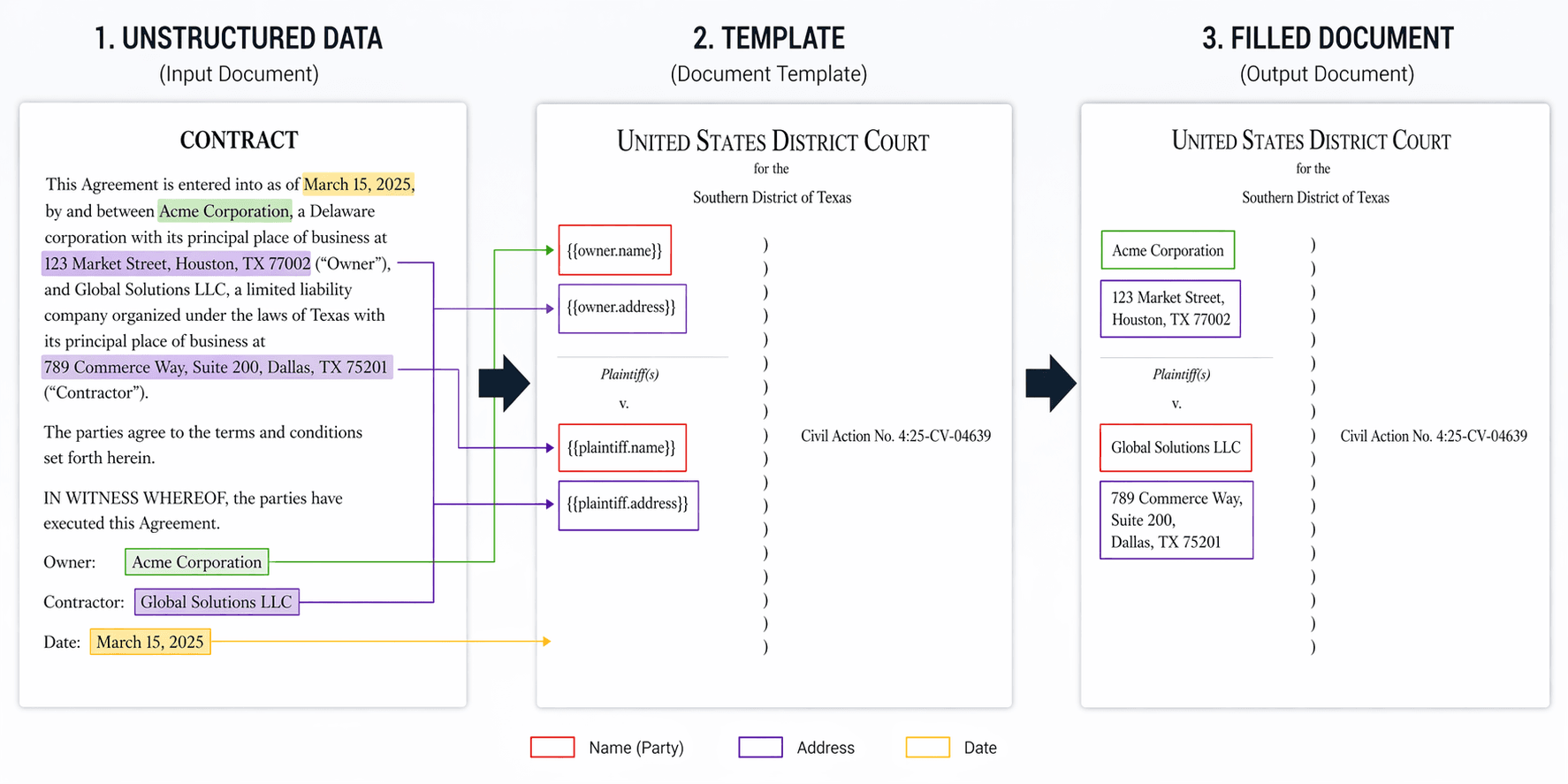
What makes modern IDP genuinely useful is that it adapts. Feed it a block of text that reads "Owner: Anthonie's Deli, located at 4444 FM 1960 RD W, HOUSTON, TX 77068" and it figures out that "Anthonie's Deli" is a tenant, that the address follows, that the ZIP is separate from the city. Feed it the same information laid out in a two-column table next time, and it still gets there. That contextual understanding is what separates intelligent document processing software from glorified regex.
The Problem We Were Actually Solving
When the firm walked us through their workflow, it went something like this. A staff member opens a browser, pulls up county records, copies the relevant fields into a central Word file — they called it the Data Document. Then they open a complaint template and go field by field, finding and replacing every placeholder. For every case. Across six federal jurisdictions, each with its own cheerful disregard for consistent formatting.
The consequences you'd expect were all there. Copy-paste errors. Fields that got missed. Staff time sunk into mechanical work instead of anything that actually required their judgment. And when a new jurisdiction entered the mix, someone had to sit down and learn its formatting quirks from scratch, usually the hard way.
What they needed wasn't automation for automation's sake. They needed a system that could swallow their messy source files, pull out the variables that mattered, let a human take a look before anything got committed, and then spit out a full document package on the other side — complaint, summons, waiver letters, the whole thing — without a single copy-paste in the pipeline.
That's a pretty clean description of what intelligent document processing solutions are for. The interesting design question was how to build it in a way that wasn't chained to one client.
Why We Started with a Prototype, Not a Build
Before any of the actual engineering started, we had a conversation that turned out to be more important than any technical decision that came after it.
The IDP market right now is — not to put too fine a point on it — loud. There's no shortage of vendors promising that intelligent document processing will transform your business. The problem is that once you start looking for concrete ROI cases outside of a handful of Fortune 500 showcases, the evidence thins out fast. A lot of noise. Not much signal.
For any mid-sized firm being asked to commit real budget to a document automation project, that's not a great position to start from. You don't know if the vendor's demo will hold up on your actual documents. You don't know if the workflow will match how your team really operates. You don't know if the system will get stuck on the edge cases that make up half of what you process. Everybody's willing to show you a polished scenario with a clean invoice. Few are willing to show you what happens when the source file is a scanned, rotated, fax-quality mess — which, for most organizations, is Tuesday.
So we proposed a different path. Instead of pitching a full build, we suggested starting with a clickable prototype. Figma for the visuals, a stripped-down Vue frontend wired up on top so the screens would feel real under the cursor. No AI yet. No backend. Just the shape of the product — something you could open, walk through, and poke at.
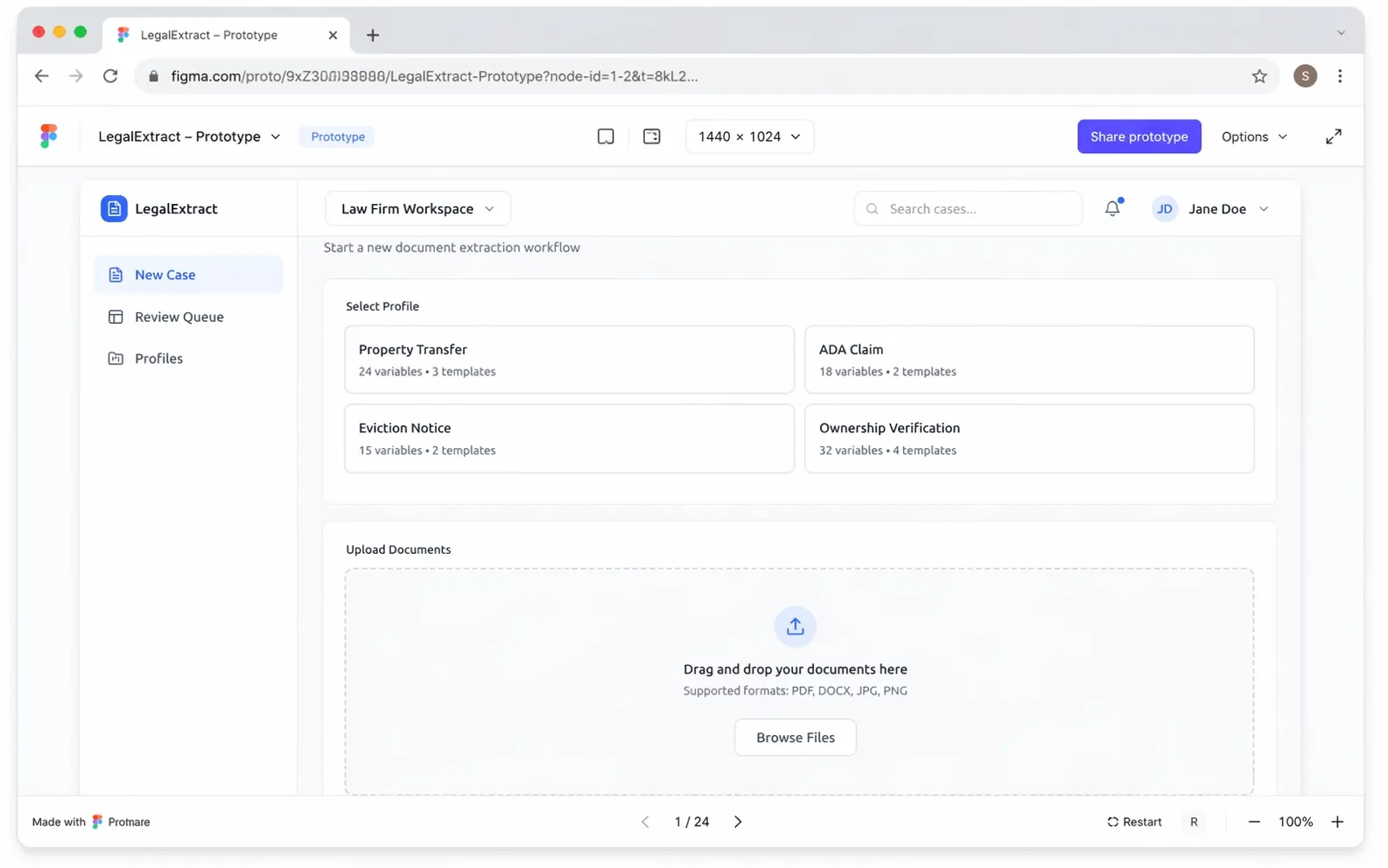
Five hours of work. $225. That was the whole thing.
The point wasn't to deliver a product. It was to put something tangible in front of the client that answered one question: does this solve the problem the way you understand it? Prototypes at that price are cheap enough to be honest about. If the client had looked at the screens and said "actually, this isn't how we think about it," we could have adjusted before any meaningful money had moved. That didn't happen — they walked through the prototype, confirmed the shape was right, and gave us the green light to move to the next step.
From Prototype to MVP
With the prototype approved, the next question was whether we could prove out real business value without committing to a large upfront build. Not a production system. Not a polished product. Just enough working code to see what actually holds up when real documents go through it — and, as importantly, what doesn't.
Total cost of the MVP: $1,440. Four days of focused work.
For context, that's roughly what a medium-length consulting report goes for. It's a small investment by any reasonable measure, and the reason we could do it that cheaply is that the prototype had already done the hard part of defining the product. By the time the MVP build started, there was nothing left to debate about the UI or the flow. We knew what we were building. All the engineering effort went into making it actually work.
The sequence matters here. Prototype first, because it's cheap enough to get wrong. MVP second, because it's cheap enough to be honest about what the technology can and can't do yet. Production build third — only if the MVP makes the case for itself.
How the Platform Works
The MVP is organized around three screens. Each one maps to a phase of the workflow. Here's how it actually flows in practice.
Step 1: Configure a Workflow
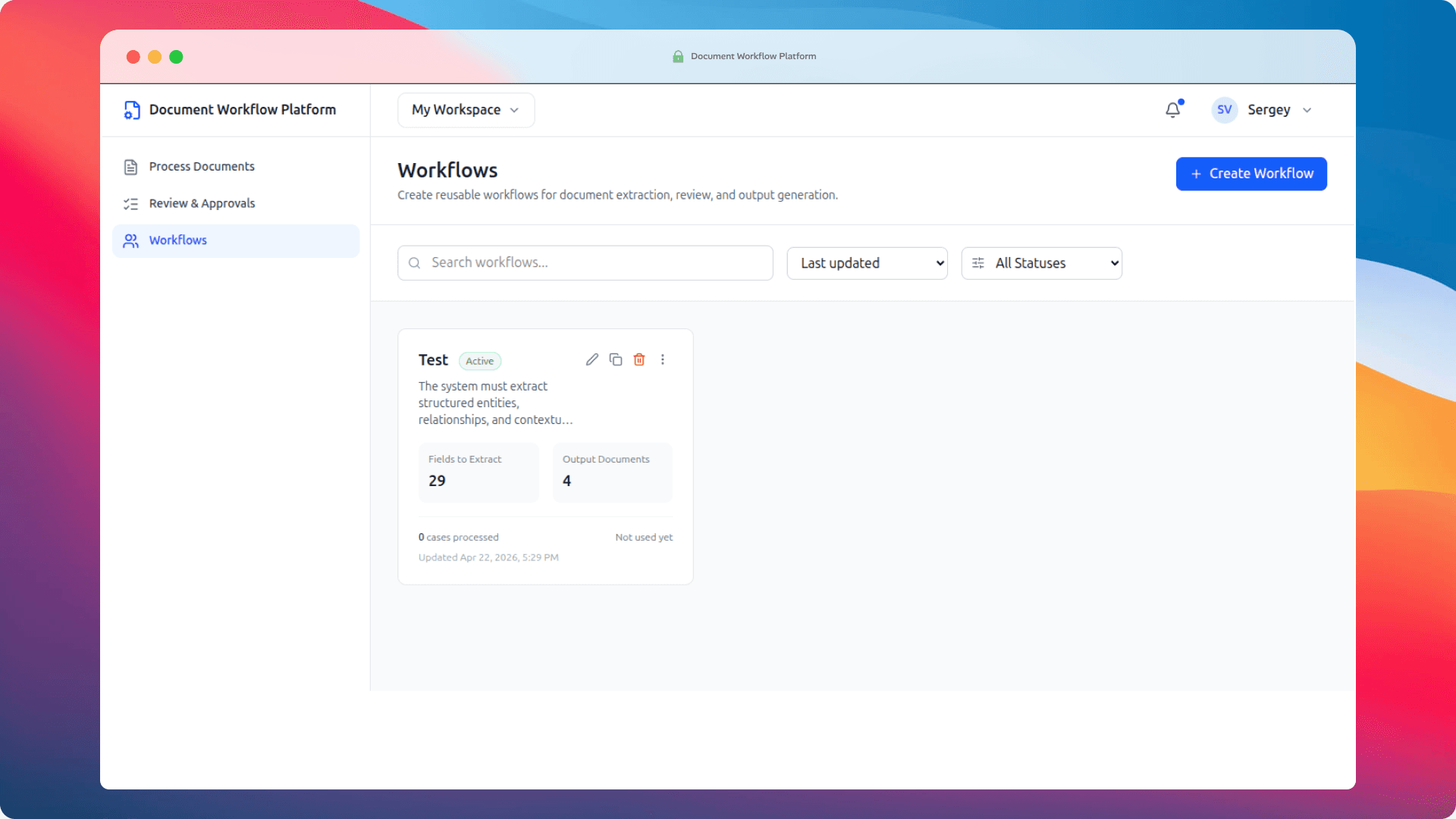
Everything starts with a Workflow. A workflow is a reusable configuration that holds two things: what to extract from incoming documents, and what to generate once that data has been confirmed.
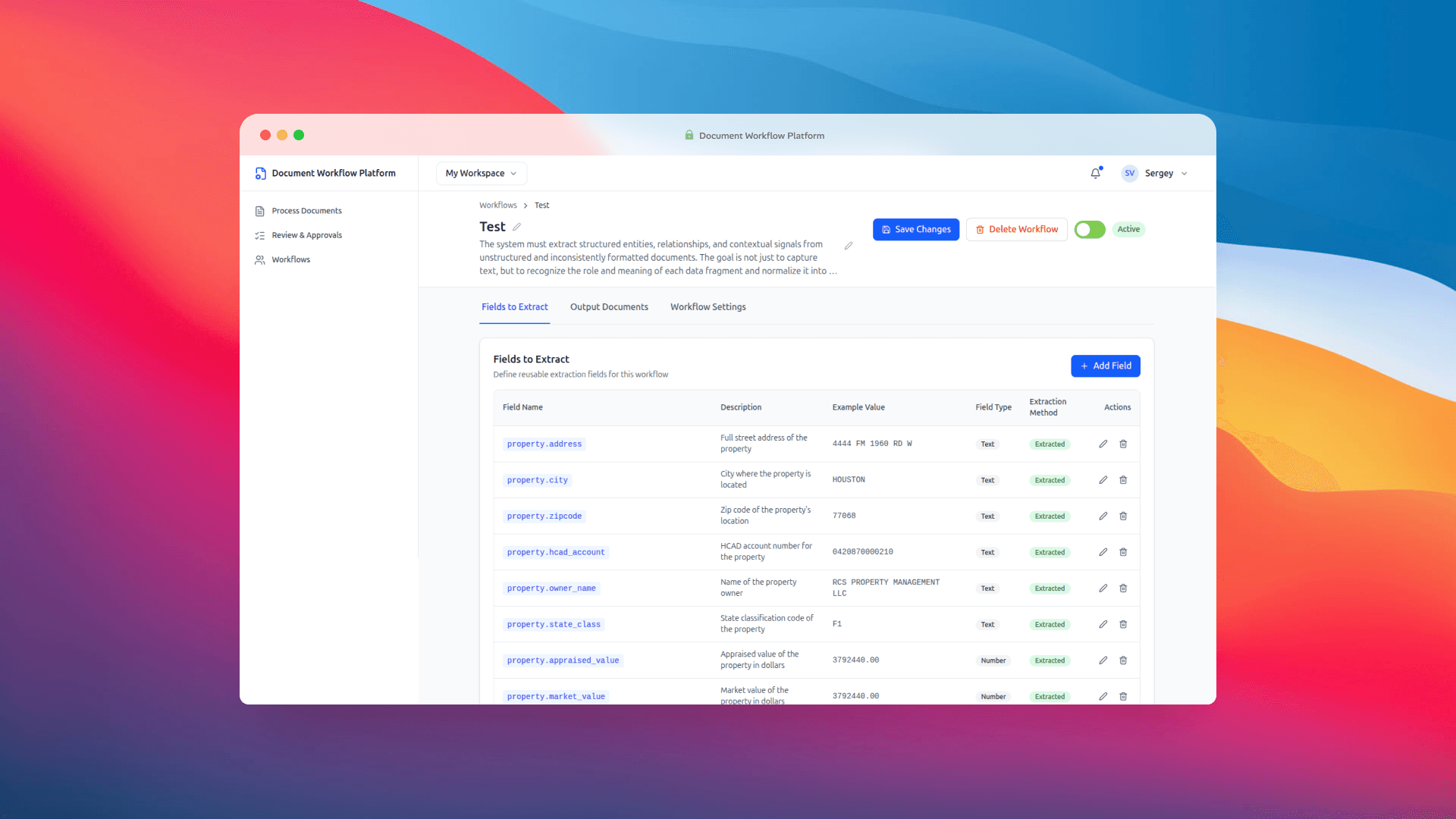
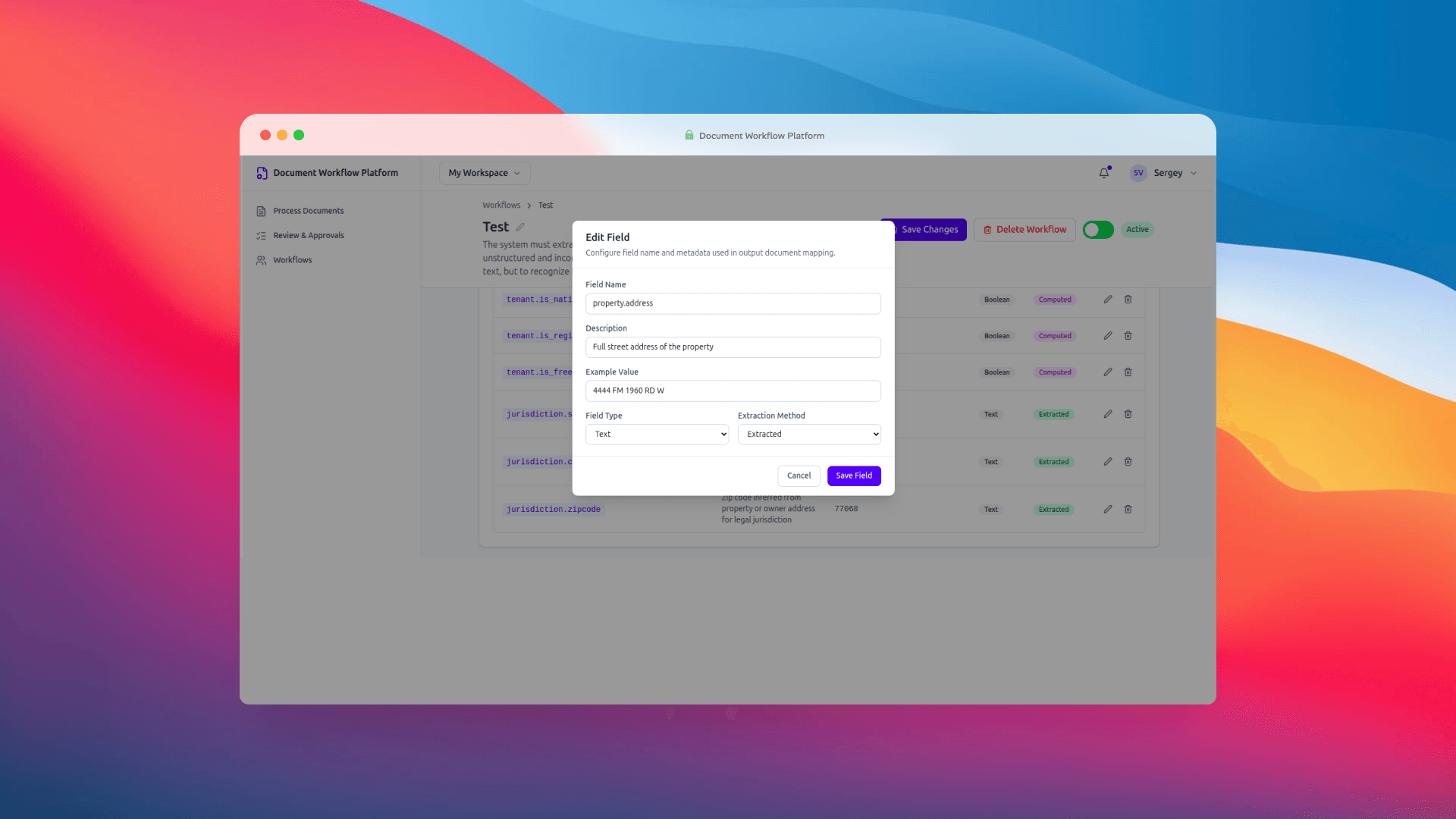
Fields get defined with a key, a description, an example value, a data type, and an extraction method (Extracted, Computed, or Manual). The keys use dot notation — owner.name, property.address, tenant.name — and those same keys double as placeholders in your output templates. {{owner.name}} in the template maps directly to the owner.name field in the workflow. Clean, predictable, no magic nested object resolution getting in the way.
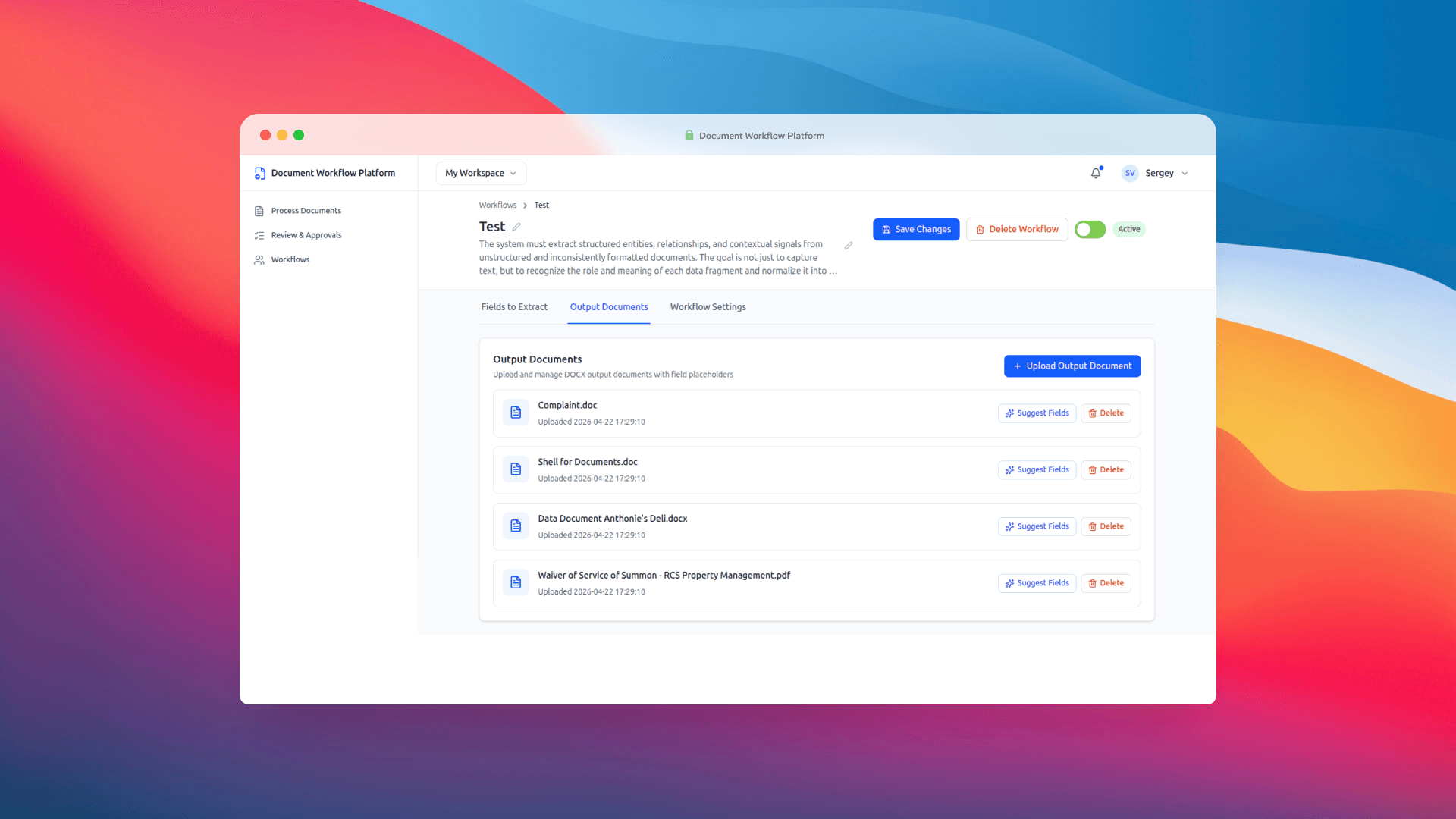
Output documents are DOCX templates uploaded directly into the workflow. Each one has a Suggest Fields button next to it, which runs the template through the AI layer and proposes extraction fields based on the placeholders it finds inside. That feature sounds small and it probably doesn't read as a headline capability, but in practice it saves a surprising amount of setup time. Instead of manually inventorying 29 placeholders in a multi-page legal template, you upload the file and get a starting list almost instantly. You edit what needs editing and move on.
The edit modal for a single field is minimal on purpose. Name, description, example, type, extraction method. Nothing else. We thought about adding more but couldn't justify any of it for an MVP.
Step 2: Process Documents
Once a workflow is ready, the operator heads to Process Documents. This is the main working surface. You pick a workflow from the list — upload is intentionally locked until you do, because every extraction run needs a schema to extract against — and then drop in source files.
PDFs, DOCX files, JPGs, PNGs. You upload them, the system hands them off to the ingestion service, and things get interesting in the background: OCR parsing, field extraction via OpenAI, case review record creation. When it's all done, the UI drops you straight into the review queue, pre-filtered to the case you just created. No hunting around.
Step 3: Review and Approve
The Review & Approvals screen is where the human-in-the-loop part earns its keep. This was the design decision we talked about the longest, and we're glad we landed where we did.
The AI is not the final authority in this workflow. It prepares a draft. A person confirms it. That sounds obvious but a lot of IDP products get it wrong by either trusting the model too much or burying the review step behind so many clicks that operators skip it. We wanted review to feel like a natural part of the flow, not a tax.
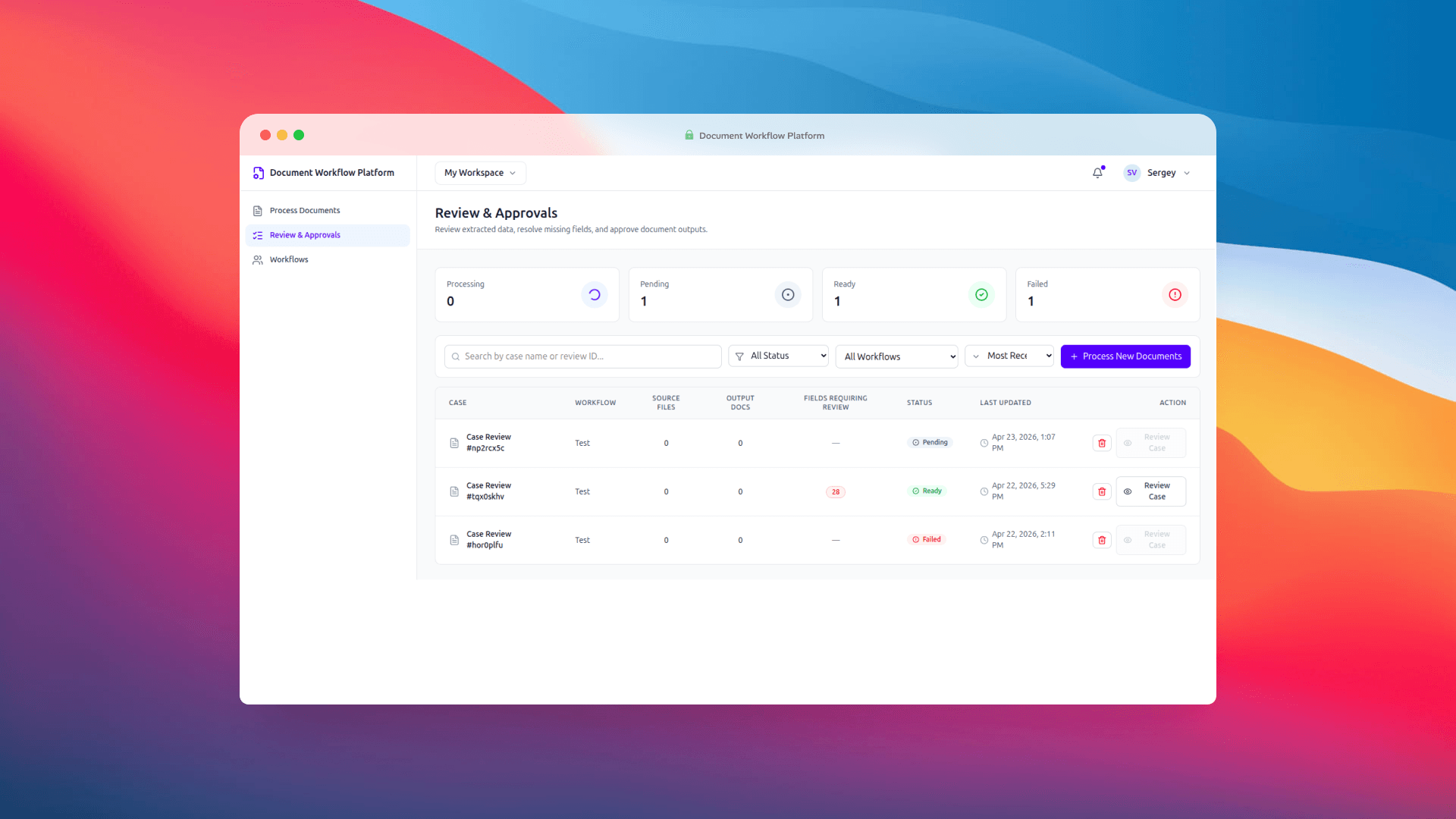
The queue shows status counts at the top — Processing, Pending, Ready, Failed — with filters and search below. Each row surfaces the workflow, source file count, output doc count, and when it was last updated. Clicking into a case opens the detail screen, which is where real review happens.
Every extracted field gets its own editable input. Fields the system couldn't fill confidently are highlighted in red. The missing field count sits prominently at the top right, so you always know how much work is left before you can approve.
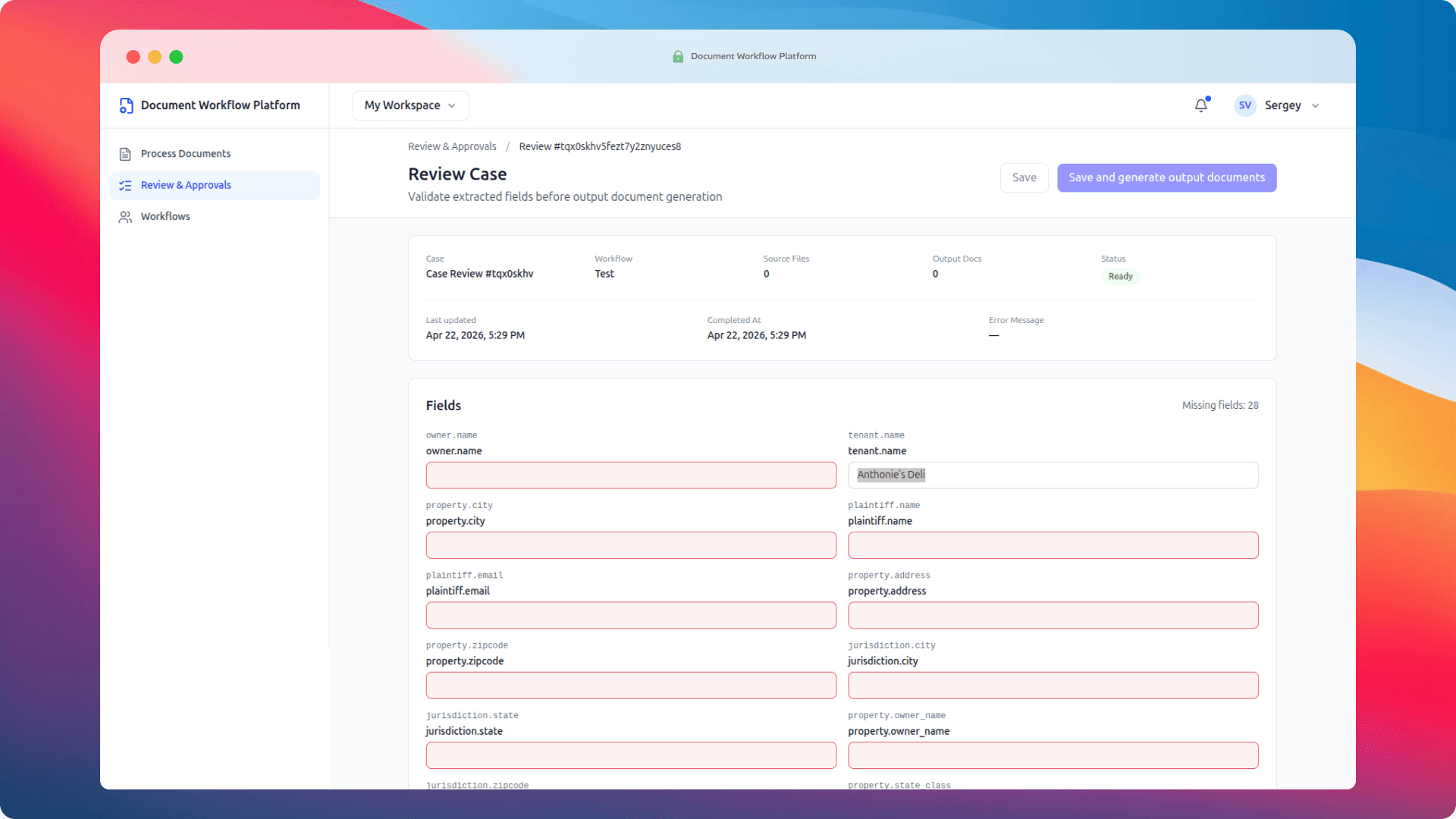
When you're satisfied, you click Save and generate output documents. The system takes the approved values, fills each DOCX template — every {{owner.name}} becomes the actual owner name, every {{property.address}} becomes the actual address — and packages the generated files as a downloadable ZIP. That's the end of the loop.
The Technology Behind It
There are two services, talking to each other over HTTP. Nothing exotic.
The frontend is Vue 3 with Vue Router, Tailwind CSS v4, and lucide-vue-next for icons. It's deliberately thin — the UI handles display and interaction and nothing else. No business logic, no persistence tricks.
Sitting behind that is an Express API. It proxies workflow and case review data to Strapi (which we're using as the backing store), forwards uploaded files to the ingestion service, and handles DOCX template filling through docxtemplater and pizzip. One small but important detail: the template fill treats placeholder keys like owner.name as literal strings, not nested object paths. That's a deliberate call. It means what you type in the workflow field definition is exactly what goes into the template, no surprises.
The heavier work happens in the Python ingestion service (FastAPI plus Uvicorn). It takes uploaded files, creates job and review records in Strapi, and runs Docling for parsing alongside OpenAI for the actual structured extraction. Each workflow can store its own OpenAI credentials, with a fallback to environment variables if none are set. That matters more than it might seem — it means you can run different models for different document types without rebuilding anything.
The shape of the whole thing is boring in a good way:
Vue 3 frontend
  → Express API
      → Strapi (workflows, case reviews)
      → Python ingestion service (OCR + AI extraction)
      → DOCX template fill service
No distributed queues, no microservice swarm, no Kubernetes. An MVP is supposed to prove that an idea works before you start engineering for the load you don't have yet. This proves it works.
What We Tested (and Why We Picked What We Picked)
Before committing to any particular stack, we wanted to resolve a question that sinks most IDP projects quietly: how well does the parsing layer handle the messy reality of real documents?
Because — and this is worth saying out loud — perfect documents don't exist. A "PDF" might be a clean, text-layer export, or it might be a low-res scan of a fax. An image might be 300 DPI or it might be a phone photo taken at a slight angle in bad lighting. You genuinely don't know until you try.
So we made a list of what to evaluate, from open-source options to the big paid providers.
Docling as the primary candidate
Docling was the first thing we looked at, and for good reason. Out of the box it covers every format we needed — and then some:
| Category | Formats |
|---|---|
| Documents | PDF, DOCX, PPTX, HTML, AsciiDoc, Markdown |
| Spreadsheets | XLSX, CSV |
| Images | PNG, JPEG, TIFF, BMP, WEBP |
| Audio | MP3, WAV, WebVTT |
On top of the format coverage, the practical advantage is that it runs on your own server. No API calls for the parsing step, no per-document provider fees, no data leaving your infrastructure for the part of the pipeline where you'd most want to keep it contained. For anyone operating under GDPR, HIPAA, or plain old corporate data residency policies, that's not a minor consideration.
Paid fallbacks we kept on the list
In case Docling didn't hold up under real-world files, we had two established cloud options ready as backup:
Both are mature, both are paid, both are entirely reasonable choices if you're already living in their respective clouds. We just wanted to see whether we could avoid the dependency.
What actually got tested
For the MVP, we ran Docling specifically on the formats our current use cases actually involve: PDF, DOCX, PNG, HTML, and JPEG.
One format it doesn't support is legacy DOC (the pre-2007 Word format). For our task list that's not a blocker — we don't have DOC files in the pipeline. If a future client needs it, we'd rather drop a DOC→DOCX conversion step in front of Docling than jump to a paid provider just for one format.
The short version: Docling handled everything we threw at it. Even running on CPU — no GPU acceleration — it processed large files (up to 5 MB) in under a minute. That's a perfectly usable response time for this kind of workflow, where the human review step is the natural rate-limiter anyway.
The text understanding layer
Parsing is only half the job. Once you have the document content as structured text, you still need a model that can read "the Registered Agent for Acme Holdings LLC is John Smith, located at 123 Main Street" and correctly populate a dozen different workflow fields from that one sentence.
For that, we used OpenAI — specifically gpt-4.1-mini-2025-04-14. The per-document cost works out to roughly $0.04 at ~37.8K input tokens, which is the kind of number where you stop worrying about per-call cost and start thinking about volume. We're planning to test other models alongside it — Claude and Gemini are both on the list — because this is exactly the kind of decision where having more than one data point matters.
How AI Enhances Document Workflow Automation
The question that comes up most when we demo this is: what is the AI actually doing, and is it pulling its weight?
Two things, really. The first is extraction from unstructured text. This is the part rule-based parsers choke on. Source documents arrive with the same fields laid out differently every time — a property address in a table on one page, a freeform paragraph on the next, a bulleted list the day after. A rule-based parser gets angry. A language model reads the document the way a person would and identifies each piece of information by what it is, not by where it is.
The second is the Suggest Fields feature. It reads an output template, finds the placeholders inside, and proposes extraction field definitions for the workflow. Not revolutionary on its own, but it collapses what would be fifteen minutes of tedious setup into a couple of seconds.
Here's what the AI is explicitly not doing: making final decisions. The review screen exists precisely because the model gets things wrong sometimes. Names get swapped. Addresses that span two lines get truncated. Edge cases get handled badly. Building around the assumption that a human will look before anything gets committed isn't a workaround — it's the honest architecture for any workflow where the output is going to end up in front of a judge, a regulator, or a customer.
Benefits of Automated Data Extraction from Business Documents
Here's what actually changes when you move from manual extraction to intelligent document processing tools. These aren't marketing claims, they're what we've seen and what the surrounding research on IDP adoption backs up.
The most obvious shift is speed. Pulling fields out of a complex legal document by hand — addresses, party names, parcel IDs, violation lists — is a 20 to 30 minute job on a good day. IDP does the extraction in seconds. Human review of a prepared draft takes a fraction of what starting from scratch would.
Then there's consistency. Two people doing manual extraction will produce slightly different results. Same person doing it on a tired Friday afternoon will produce slightly different results from Monday morning. Automated extraction against a fixed schema is boring and repetitive, which is exactly what you want from the part of the process where creative interpretation is a bug, not a feature.
Scalability is the one that matters for anyone thinking about growth. A team that manually handles 10 cases a week can't scale to 100 without hiring a proportional amount of people. When the extraction and generation phases are automated, only the review step scales with volume, and review is significantly faster than extraction from scratch.
Auditability matters in regulated spaces. Every case review in the system carries a record — what the AI extracted, what the human changed, when it got approved. That trail is valuable when someone asks questions later, and in certain industries it stops being optional and starts being a requirement.
And finally, error reduction. Copy-paste mistakes are a genuinely documented source of problems in document-heavy work. Removing the copy-paste step removes an entire category of error. Not all errors, obviously — the AI can still make mistakes of its own — but a different class of them, and a class that the human reviewer is much better positioned to catch than the original typist ever was.
Intelligent Document Processing Use Cases
The law firm is one use case. It happens to be the one that sparked this build. But the same pattern — messy inputs, structured extraction, human review, generated output — shows up everywhere once you start looking for it.
Insurance claims. Accident reports, repair estimates, medical records, photos. They arrive from a hundred different sources in wildly different shapes. Adjusters spend time doing extraction that should be automated. Intelligent document processing lets them spend that time on judgment calls instead.
Credit union and bank onboarding. KYC packets come in through whatever channel the member is comfortable with. Driver's licenses, utility bills, employment letters. The data inside needs to populate onboarding records in a consistent format. This is textbook IDP territory.
Healthcare prior authorization. Clinical notes and referral documents carry procedure codes, diagnoses, patient identifiers. Extraction and review is exactly what's needed before any of it gets submitted.
Contract review. Law firms and procurement teams receive contracts that need specific terms pulled out for tracking — dates, parties, amounts, termination clauses. Traditionally this is a paralegal or analyst job. With the right workflow, it's a first-pass extraction followed by a quick review.
Government filings and compliance work. Permits, licenses, regulatory submissions. All of them have source documents full of structured data that needs to end up in another structured document somewhere downstream.
The common thread is hard to miss. Wherever documents arrive inconsistently and end up as inputs to another document, there's a strong case for intelligent document processing. Volume helps — the math gets better the more cases you process — but even moderate-volume operations benefit from the consistency alone.
Who Should Pay Attention to This
The ICP work we did while thinking about go-to-market points to a consistent profile. Mid-to-large organizations, 500 to 5,000 employees, operating in verticals with heavy document workflows and formal compliance requirements. In the US, that lands on health insurers, credit unions, and legal firms. In the UK, on FCA-authorized insurance brokers and intermediaries.
The buyers aren't pure tech buyers. They're operations and IT leadership — COOs, CIOs, directors of operations. They care about whether the process gets faster and more accurate, not about the model architecture.
One thing that surprised us in the research: across enterprise adopters of IDP, reducing headcount is consistently the lowest-ranked adoption driver. Organizations buying intelligent document processing solutions are mostly after speed and quality improvements in existing workflows, with human oversight deliberately retained at the decision points. That tracks with the architecture we ended up with. The human-in-the-loop piece isn't a compromise — it's what the market actually wants.
Where This Goes Next
This is an MVP. The core screens function, the pipeline runs end-to-end, the template fill logic is solid. What comes after is the layer that turns a working prototype into something deployable at real volume.
On the product side, a few things are near the top of the list:
- Field-level confidence scoring. Right now a field is either filled or empty. Showing confidence gives reviewers a signal about where their attention actually matters.
- OCR quality checks. Catching a bad scan before it hits the extraction pipeline saves everyone downstream.
- Batch output packaging. Generating and packaging multiple documents in a single operation, with versioning.
- Stronger audit trails. More granular logging around what changed during review, who changed it, and when.
- Authentication and proper roles. Multi-user support with role-based access, which is the line between a prototype and something you can run in a regulated environment.
On the infrastructure side, the plan is to deploy on CPU hosting in the $70–$150/month range, depending on load and document volume. That's deliberately modest — the whole point of the architecture is that you don't need a GPU fleet to make this work at the volumes most target customers actually operate at. The web UI provides user access; file processing and storage happen on the server; text understanding goes out to paid models (OpenAI, Claude, Gemini) depending on what produces the best results for a given document type.
The more interesting bet we want to test is Ollama. If open-source models hold up against the paid ones for our specific extraction tasks, that unlocks something worth having: a fully autonomous setup, 100% independent from external AI providers, with every byte of document data staying on the server. In regulated industries, that isn't a nice-to-have — it's often the difference between being able to deploy at all and watching the compliance team veto the whole thing because cloud AI is off-limits for the data in question.
The ingestion service is also synchronous right now. A job queue for longer-running extractions is the obvious next engineering piece once document volumes start exceeding what a single worker can handle without people sitting around waiting.
Want to Try It?
The platform can be spun up in the cloud on request, specifically for testing. If you'd like access to a hosted instance to run your own documents through, get in touch with us at https://sysint.net/contact-us.html and we'll set something up.
For context on the broader market: established cloud-based intelligent document processing solutions include ABBYY, Kofax, UiPath Document Understanding, AWS Textract, and Google Document AI. Each has its own trade-offs around pricing, integration depth, and customization. What this MVP shows is that you don't have to start from zero to get something purpose-built for your actual document types and outputs. The open-source building blocks — Docling, OpenAI, docxtemplater — are more than capable of carrying a serious workflow.
Closing Thoughts
The thing that stuck with us after that first call with the law firm wasn't how specific their problem was. It was how universal. They were describing a workflow that exists, in some form, in nearly every document-heavy industry. Data arrives inconsistently. Humans extract it by hand. It gets pushed into templates manually. Errors accumulate. Staff burn out on the tedious parts and don't have enough time for the parts that actually need them.
What we ended up with is a sequence that, in hindsight, is the right way to approach any project like this in a market full of noise. A $225 prototype to confirm the shape of the product. A $1,440 MVP to confirm the technology can actually do the work. And only then, if both of those check out, the conversation about what a full production build looks like.
The goal with intelligent document processing isn't to push people out of the loop. It's to let them stop doing the parts machines handle better, and spend their time on the parts that actually require a person. That division of labor is the right one. And it turns out you can build a working version of it in four days — for less than most companies spend on a single consulting engagement.
'%3e%3cellipse%20cx='508.5'%20cy='387.5'%20rx='324.5'%20ry='234.5'%20fill='url(%23paint0_linear_74_1900)'/%3e%3c/g%3e%3cdefs%3e%3cfilter%20id='filter0_f_74_1900'%20x='0'%20y='-31'%20width='1017'%20height='837'%20filterUnits='userSpaceOnUse'%20color-interpolation-filters='sRGB'%3e%3cfeFlood%20flood-opacity='0'%20result='BackgroundImageFix'/%3e%3cfeBlend%20mode='normal'%20in='SourceGraphic'%20in2='BackgroundImageFix'%20result='shape'/%3e%3cfeGaussianBlur%20stdDeviation='92'%20result='effect1_foregroundBlur_74_1900'/%3e%3c/filter%3e%3clinearGradient%20id='paint0_linear_74_1900'%20x1='227.37'%20y1='272.209'%20x2='619.387'%20y2='679.264'%20gradientUnits='userSpaceOnUse'%3e%3cstop%20stop-color='%23863CF9'/%3e%3cstop%20offset='0.239583'%20stop-color='%23B887F4'/%3e%3cstop%20offset='0.494792'%20stop-color='%239FB4FC'/%3e%3cstop%20offset='0.776042'%20stop-color='%23B7E4BB'/%3e%3cstop%20offset='1'%20stop-color='%23FCFD64'/%3e%3c/linearGradient%3e%3c/defs%3e%3c/svg%3e)